Color Spectrum (SUB-PATCH)
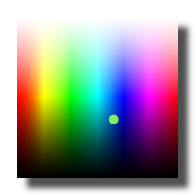
Simple color selector displayed as a spectrum: click or drag in the spectrum of its panel to pick a color, sent to the output outlet. It is built on a panel-xy-pad whose position drives a color-hsl module.
Connect output to any color inlet.
In the browser: tab modules, All Modules > Color > Color Spectrum.
Settings
output
The color selected in the spectrum.
Panel
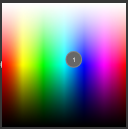
XY pad
The spectrum. The horizontal position chooses the hue, the vertical position goes from white at the top to black at the bottom, through the full colors in the middle. The cursor shows the selected color.
See also
- Data Manipulation Calc Min (SUB-PATCH)
- Multi Knob (SUB-PATCH)
- MIDI Send All Notes OFF (SUB-PATCH)
- Data Manipulation Hysteresis (SUB-PATCH)
- Light MIDI to Dimmer (SUB-PATCH)
- Empty Sub-Patch (SUB-PATCH)
- Phase Voc Forward (SUB-PATCH)
- Audio Analysis Beat Follower Threshold (SUB-PATCH)
- Data Generator Random Integer (SUB-PATCH)
- MIDI Delay Feedback Pitch (SUB-PATCH)
- Audio Analysis Beat Follower (SUB-PATCH)
- Generalized VBAP 2D (SUB-PATCH)
- MIDI Freez (SUB-PATCH)
- Color Spectrum (SUB-PATCH)
- Data Manipulation Rec XY (SUB-PATCH)
- Phase Voc Inverse (SUB-PATCH)
- Data Manipulation Local Max (SUB-PATCH)
- Data Manipulation Calc Max (SUB-PATCH)
- Data Manipulation Local Min (SUB-PATCH)
- Data Generator Random Law (SUB-PATCH)
- Create Sub-Patches
version 7.0.250921
Edit All Pages