Tutorial : Use the Playlist
The playlist-panel provides an easy way to manage your workspaces and recall them on stage.
open the playlist
To open the playlist-panel click on PLAYLIST on the master-panel.
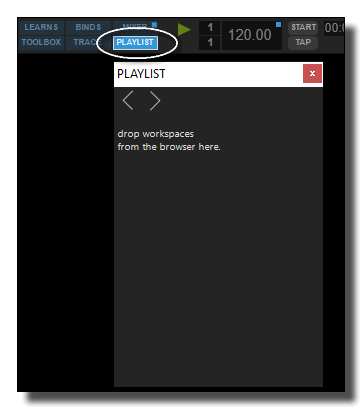
The playlist is empty by default.
add workspaces
To add workspaces in the playlist, drag&drop them from the browser-panel.
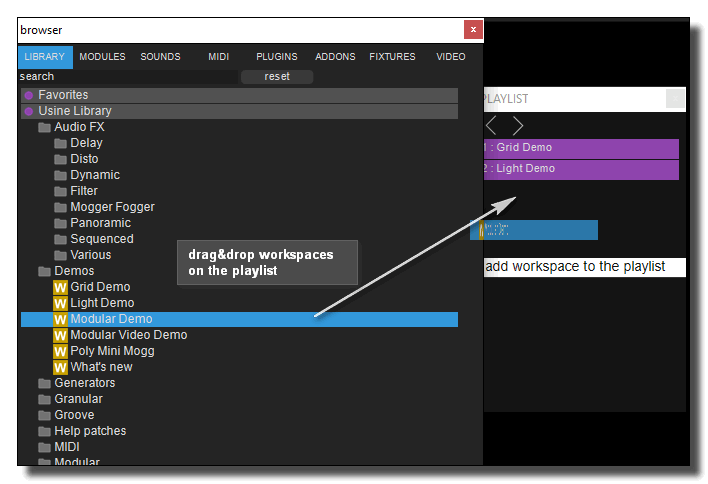
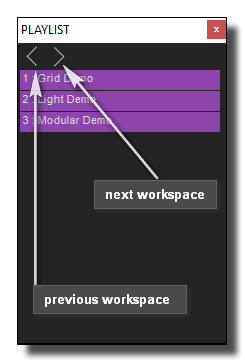
switch to next or previous Workspace
You can use the left/right arrows on top of the playlist window, respectively to open the previous/next workspace in the list.
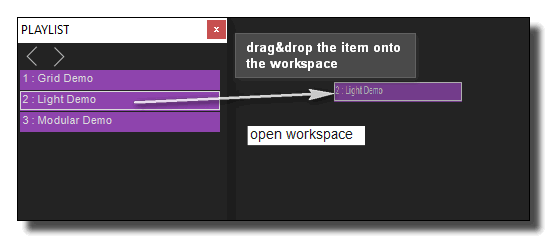
You can also drop any item directly on the main Usine window to open the workspace.
Usine Tutorial
- Tutorial : Understand Usine
- Tutorial : Basic Commands you have to know
- Tutorial : Patching
- Tutorial : MIDI & Key Assignations
- Tutorial : Audio Plug-ins
- Tutorial : The Grid
- Tutorial : The Light Engine
- Tutorial : Surround
- Tutorial : The Video Engine
- Tutorial : Customize your interface
- Tutorial : Use Modular
- Tutorial : OSC (Open-Sound-Control)
- Tutorial : Record audio
- Tutorial : Interface Builder (IB)
- Tutorial : Physics Engine
- Tutorial : Arduino
- Tutorial : Use Clusters
- Tutorial : Use the Mixer Panel
- Tutorial : Use the Playlist
- Tutorial : Use VCA's
- Tutorial : Pixel Mapping
- Tutorial : Create Stand-Alone Application
- Tutorial : Protect a Patch with a password
- Tutorial : Create Help File for a Patch
- Tutorial : Remote control of Usine from Internet
- Tutorial : Global Arrays
- Tutorial : Use Procedures
- Tutorial : Laser Engine
- Tutorial : How to use Chunks
See also
Usine Tutorial
- Tutorial : Understand Usine
- Tutorial : Basic Commands you have to know
- Tutorial : Patching
- Tutorial : MIDI & Key Assignations
- Tutorial : Audio Plug-ins
- Tutorial : The Grid
- Tutorial : The Light Engine
- Tutorial : Surround
- Tutorial : The Video Engine
- Tutorial : Customize your interface
- Tutorial : Use Modular
- Tutorial : OSC (Open-Sound-Control)
- Tutorial : Record audio
- Tutorial : Interface Builder (IB)
- Tutorial : Physics Engine
- Tutorial : Arduino
- Tutorial : Use Clusters
- Tutorial : Use the Mixer Panel
- Tutorial : Use the Playlist
- Tutorial : Use VCA's
- Tutorial : Pixel Mapping
- Tutorial : Create Stand-Alone Application
- Tutorial : Protect a Patch with a password
- Tutorial : Create Help File for a Patch
- Tutorial : Remote control of Usine from Internet
- Tutorial : Global Arrays
- Tutorial : Use Procedures
- Tutorial : Laser Engine
- Tutorial : How to use Chunks
version 7.0.250921
Edit All Pages