Data Manipulation Rec XY (SUB-PATCH)
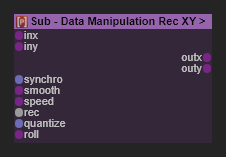
Records and replays X Y movements. Connect the two values to record to inx and iny, for example the X and Y outlets of a panel-xy-pad, turn rec ON while you move, then turn it OFF: the recorded movement is played on outx and outy, in a loop or synchronized on the cycles or the bars of Usine.
The recorded curves are shown on the panel, where you can also draw them by hand.
In the browser: tab modules, All Modules > Data > Manipulation > Data Manipulation Rec XY.
Settings
inx
X values to record.
iny
Y values to record.
synchro
Playing synchronization:
- pause: the playing is paused.
- loop: the recording is played in a loop, at the speed set by speed.
- cycle: the recording is played at each cycle.
- bar: the recording is played at each bar.
smooth
Smoothing applied to the played values, from 0.01 to 10000 ms.
speed
Playing speed coefficient, from 0 to 10 x. Only when synchro is set to loop:
- 1: played at the recorded speed.
- 2: played 2 times faster than the recorded speed.
- 0.5: played 2 times slower than the recorded speed.
rec
ON: records the X Y movement received on inx and iny.
quantize
Quantization of the recorded values on the tempo of Usine:
- no
- bar
- beat
- 8th
- triplet
- 16th
roll
Rolls the recorded values to change the start point of the playing, from 0 to 1.
outx
Played X values.
outy
Played Y values.
Panel
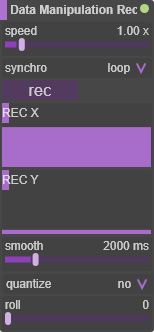
The panel holds the controls of the inlets described above (speed, synchro, rec, smooth, quantize, roll) and the two recording curves.
REC X
Displays the recorded curve of the X values. You can also draw directly on it.
REC Y
Displays the recorded curve of the Y values. You can also draw directly on it.
See also
- Data Manipulation Calc Min (SUB-PATCH)
- Multi Knob (SUB-PATCH)
- MIDI Send All Notes OFF (SUB-PATCH)
- Data Manipulation Hysteresis (SUB-PATCH)
- Light MIDI to Dimmer (SUB-PATCH)
- Empty Sub-Patch (SUB-PATCH)
- Phase Voc Forward (SUB-PATCH)
- Audio Analysis Beat Follower Threshold (SUB-PATCH)
- Data Generator Random Integer (SUB-PATCH)
- MIDI Delay Feedback Pitch (SUB-PATCH)
- Audio Analysis Beat Follower (SUB-PATCH)
- Generalized VBAP 2D (SUB-PATCH)
- MIDI Freez (SUB-PATCH)
- Color Spectrum (SUB-PATCH)
- Data Manipulation Rec XY (SUB-PATCH)
- Phase Voc Inverse (SUB-PATCH)
- Data Manipulation Local Max (SUB-PATCH)
- Data Manipulation Calc Max (SUB-PATCH)
- Data Manipulation Local Min (SUB-PATCH)
- Data Generator Random Law (SUB-PATCH)
- Create Sub-Patches
version 7.0.250921
Edit All Pages