Color Spectrum Panel
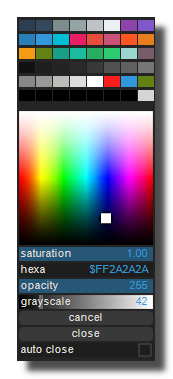
The Color spectrum dialog box returns the ARGB value of the color selected by the user.
Settings
saturation
Changes the global saturation of the color palette.
hexa
Hexadecimal value of the selected color in the format AARRGGBB.
opacity
Applies an opacity to the selected color (0 to 255).
gray scale
Changes the selected color into a gray color (0 to 255).
complementary
Changes the selected color into its complementary color.
auto close
Determines if the dialog box is automatically closed when a color is selected in the palette buttons (ON by default).
cancel
Restores the color of the object and closes the dialog box.
close
Keeps the new color, adds it to the last used colors and closes the dialog box.
See also
- Color Spectrum Panel
- Color Spectrum (SUB-PATCH)
- Global Constant Color Set Value
- Global Constant Color Get Value
- Video to Color Array
- Color Array to Video
- Color
- Color RGB
- Color Array Random
- Color Opacity
- Color HSL
- Color Change Format
- Color Array Mult
- Color Palette Number
- Color Cielab
- Color Palette
- Color Transformer
- Color Smooth
- Color Complementary
- Color Array Modules
- Color Array Add
- Color CMYK
- Color Dimmer
- Color Array to Colors
- Color Mix Mixer
- Color Change Saturation Luminance
- Color Mix Selector
- Color Array Concat
- Color Array Display
- Usine Setup Value Color
version 7.0.250921
Edit All Pages