Usine Objects
SetObject('patch.mixer.master-gain', 0.75);
Trace(GetObjectFloat('usine.master-synchro.tempo'));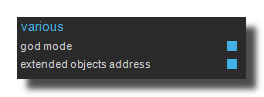
- To use Usine-Object it is recommended to activate the god mode in the setup-panel-tab-expert.
- The option extended-objects-addresses creates a larger set of Usine-Objects addresses including settings, and commands
References
get object values
| Procedure | Description |
|---|---|
function GetObject(name: string): variant; |
Get the value of a Usine object as a generic variant (works with float, integer, or string — slower) |
function GetObjectFloat(name: string): float; |
Get the float value of a Usine object (optimized for performance) |
function GetObjectInteger(name: string): integer; |
Get the integer value of a Usine object (optimized for performance) |
function GetObjectArray(name: string; index: integer): float; |
Get the float value from an indexed array object in Usine |
function GetObjectMIDI(name: string; index: integer): TMIDI; |
Get a MIDI event value from a Usine object array |
function GetObjectColor(name: string): TAlphaColor; |
Get a single color value from a Usine object |
function GetObjectArrayColor(name: string; index: integer): TAlphaColor; |
Get a color value from an array of colors in a Usine object |
function GetObjectString(name: string): string; |
Get a string value from a Usine object |
set object values
| Procedure | Description |
|---|---|
procedure SetObject(name: string; v: variant); |
Set the value of a Usine object using a generic variant (works with float, integer, or string — slower) |
procedure SetObjectFloat(name: string; v: float); |
Set the float value of a Usine object (optimized for performance) |
procedure SetObjectInteger(name: string; v: integer); |
Set the integer value of a Usine object (optimized for performance) |
procedure SetObjectArray(name: string; index: integer; v: float); |
Set the float value of an element in an array-type Usine object |
procedure SetObjectMIDI(name: string; index: integer; midi: TMIDI); |
Set a MIDI event value in a Usine object array |
procedure SetObjectColor(name: string; c: TAlphaColor); |
Set a single color value of a Usine object |
procedure SetObjectArrayColor(name: string; index: integer; c: TAlphaColor); |
Set a color value in an array of colors within a Usine object |
procedure SetObjectString(name: string; v: string); |
Set the string value of a Usine object |
object Flow Length
| Procedure | Description |
|---|---|
function GetObjectLength(name: string): integer; |
Get the length of a Usine object (used for arrays or MIDI data) |
procedure SetObjectLength(name: string; length: integer); |
Set the length of a Usine object (used for arrays or MIDI data) |
object various
| Procedure | Description |
|---|---|
function ObjectExists(name: string): boolean; |
Return True if the specified object exists in the current Usine workspace |
function FindObject(name: string): string; |
Return a comma-separated list of all object names matching the given pattern |
function GetObjectListHash: string; |
Return a hash string representing the current list of Usine objects (useful for detecting changes) |
findObject('x-1') returns the list (as a commaText) of all object containing the string x-1 inside the current workspace.
FindObject procedure can be very slow to process, see bellow for a solution.
Presentation
Each object in Usine has an internal script name, generally made of the concatenation of its captions. For example the master-synchro tempo is identified by the internal name usine.master-synchro.tempo.
Then inside the script you can use the SetObject of GetObject functions to respectively set or get the value of the object.
Example : Random Tempo
// Random Tempo
procedure Process;
var tempo : float;
begin
  tempo := 30+100*random;
  SetObject('usine.master-synchro-panel.tempo',tempo);
end;
Example : Trace the Tempo
// trace the tempo
procedure Process;
begin
  Trace(getObject('usine.master-synchro.tempo'));
end;
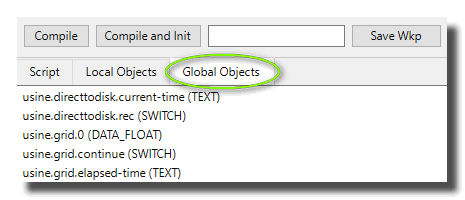
The list of all available global Usine-Objects is available in the third tab of the script-editor.
Accessing to controls inside a patch
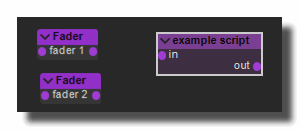
We can access to controls (faders, switches, buttons, listboxes) inside a patch very simply. For example, in the following patch:
You can take a look on the second Tab of the script-editor to retrieve the names of available objects:
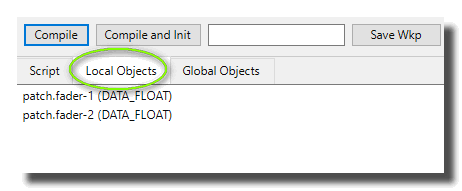
In our case the names are patch.fader-1 and patch.fader-2. The prefix is patch. followed by the caption of the control.
If two objects have the same name (or caption), the second object is ignored and can't be accessible.
Example : link 2 faders
// Link 2 controls
PROCEDURE PROCESS();
var v : float;
BEGIN
    v := getObject('patch.fader-1');
    setObject('patch.fader-2',v);
END;
Accessing to any modules inside a patch
Let's take an example with a LFO module in a patch.
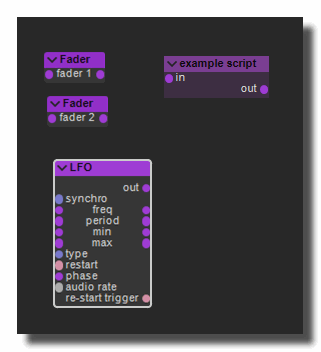
To have a direct access to modules settings inside a script, the first thing is to set a user-name for the module with [Alt+Click]. In this example we choose MYLFO.
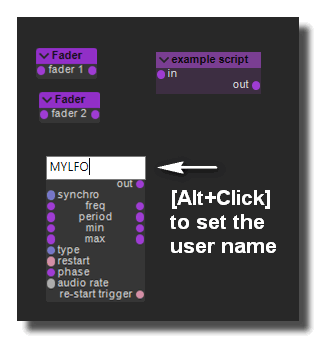 give a name to the module
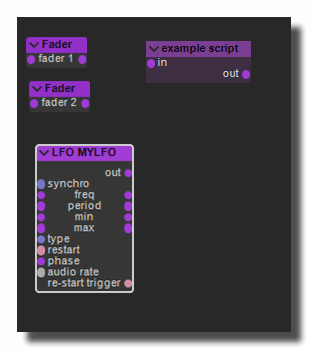
Now, inside the script-editor you can get the list of available objects in the script. As you can see the script engine can access to almost all parameters of the module without any wire.
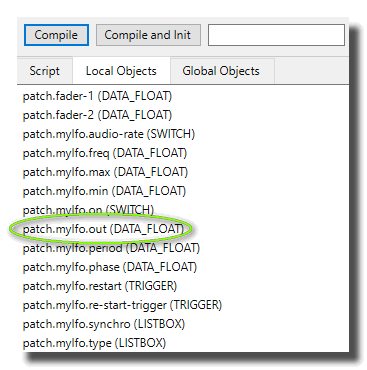
Example : get the value of the LFO
//Link a LFO out to a Fader
PROCEDURE PROCESS();
var v : float;
BEGIN
    v := getObject('patch.mylfo.out');
    setObject('patch.fader-1',v);
END;
Accessing to objects inside a sub-patch
Controls inside sub-patches are accessible with the name of the sub-patch followed by the voice number.
patch.name-of-the-sub-patch.voice-number.name-of-the controlFor example in the following patch:
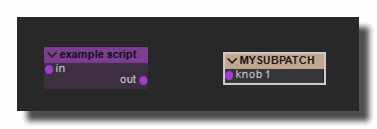
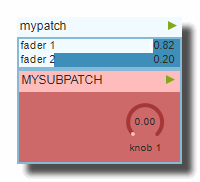
You can check the list of available controls:
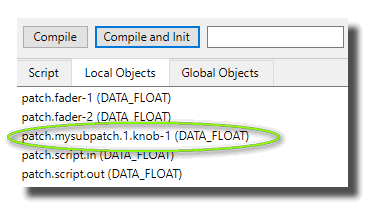
You can see that the name of the knob-1 is patch.mysubpatch.1.knob-1
//Link a fader to a sub-patch knob
PROCEDURE PROCESS();
var v : float;
BEGIN
    v := getObject('patch.fader-1');
    setObject('patch.mysubpatch.1.knob-1',v);
END;
Array objects
You can manipulate Array objects with the functions:
- GetObjectArray
- SetObjectArray
- GetObjectLength
- SetObjectLength
Example : copy an array to another array
In the simple following patch we want to copy the output of ARRAY1 to the input of ARRAY2.
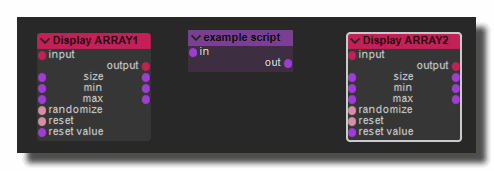
PROCEDURE PROCESS();
var v : float;
var size,i : integer;
BEGIN
    size := getObjectLength('patch.array1.output');
    setObject('patch.array2.size',size);
    for i := 0 to size-1
    do begin
       v := getObjectArray('patch.array1.output',i);
       setObjectArray('patch.array2.input',i,v);
    end;
END;
MIDI objects
You can manipulate MIDI objects with the functions:
- GetObjectMIDI
- SetObjectMIDI
- GetObjectLength
- SetObjectLength
Example : copy an array to another array
In the simple following patch we want to copy the output of RANDOMMIDI to the input of SAMPLER.
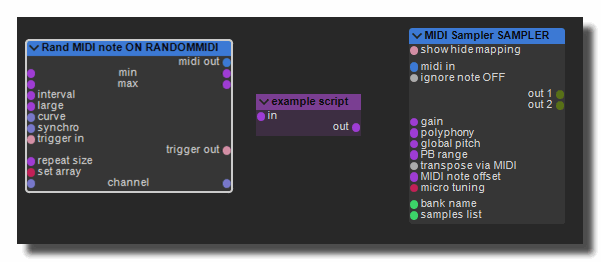
PROCEDURE PROCESS();
var M : TMIDI;
var size,i : integer;
BEGIN
    size := getObjectLength('patch.randommidi.midi-out');
    setObjectLength('patch.sampler.midi-in',size);
    for i := 0 to size-1
    do begin
       M := getObjectMIDI('patch.randommidi.midi-out',i);
       setObjectMIDI('patch.sampler.midi-in',i,M);
    end;
END;
Color objects
In the simple following patch we want to copy the output color array of RANDOMCOLOR to the input colors of XYDRAW.
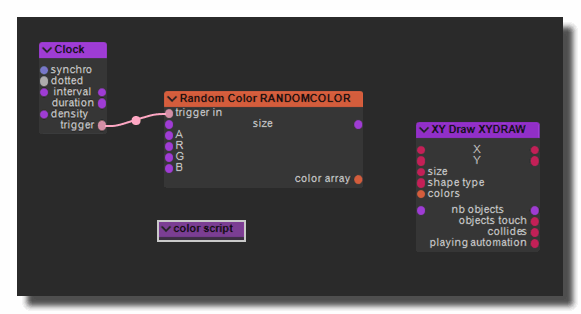
PROCEDURE PROCESS();
var i : integer;
var col : TalphaColor;
BEGIN
  for i := 0 to  31
  do begin
    col :=  GetObjectArrayColor('patch.randomcolor.color-array',i);
    SetObjectArrayColor('patch.xydraw.colors',i,col);
  end;
END;
Access to everything
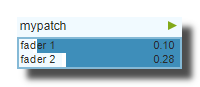
Inside a script you can access to any object anywhere in the workspace not only in the current patch. You have to remember that objects are identified by their captions. So if we have the rack 'myrack' which contains the patch 'mypatch' which contains 'fader 1' and 'fader 2'.
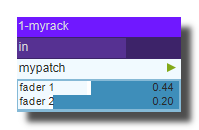
The global objects gives you the names of the Usine Objects to access to 'fader-1' or 'fader 2' anywhere in Usine.
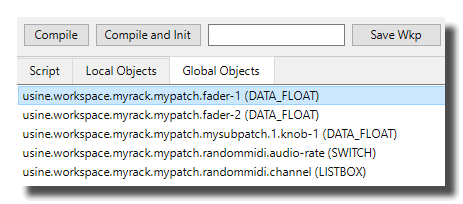
The global names are:
usine.workspace.myrack.mypatch.fader-1usine.workspace.myrack.mypatch.fader-2
If two objects (rack, patch, control, module) have the same name, the second object is ignored and can't be accessible.
FindObject is slow
The FindObject procedure is very slow and it's not necessary to execute it all the time, but only when something has changed in the workspace. For that you can use GetObjectsListHash which returns the hash string of the UsineObjects list. If the something has changed in Usine (rack,patch,modules,etc..) the hash string will be different.
In other words, you can execute a part of a script only if the workspace has changed.
// USE HASH
var FLastHash : string;
if GetObjectsListHash<> FLastHash
then begin
      FLastHash := GetObjectsListHash;
      s := findObject('myobjectname.out');
      ...
end;
See also
version 7.0.250921
Edit All Pages