Fixture Panel
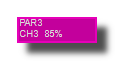
Fixtures are the base component of the Light engine in Usine that you can put onto the plot panels.
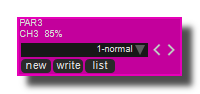
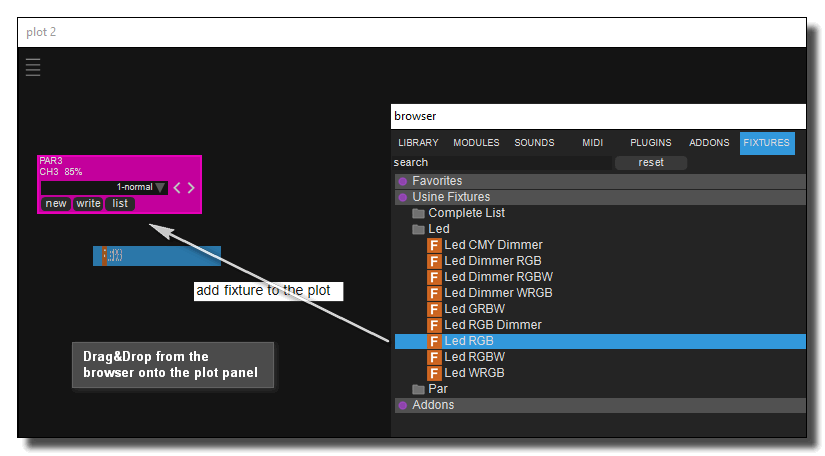
To create a fixture open the browser-panel (fixtures tab) and drag&drop fixtures onto the plot-panel
Usine contains a complete set of ready to use fixtures, which covers almost all real life situations. Fixtures are compatible with DMXIS fixture's files. See fixture-editor
Commands
copy fixture
Copies the fixture in the clipboard [CTRL/CMD + C].
paste fixture
Pastes the copied fixture in the plot [CTRL/CMD + V].
cut fixture
Deletes the fixture and copies it in the clipboard [CTRL/CMD + X].
duplicate fixture
Duplicates the fixture [CTRL/CMD + D].
duplicate fixture nth
Asks for a number of copies and creates them, each copy on the DMX channels that follow the last channel used in the plot.
delete fixture
Deletes the fixture [DEL].
Settings
caption
Displayed caption of the object. Click to enter a new name.
image
Image displayed on the fixture.
parameters
List of available parameters.
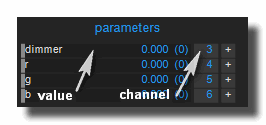
In Usine, all fixture's parameters are in the range [0..1], to be compatible with most of built-in modules.
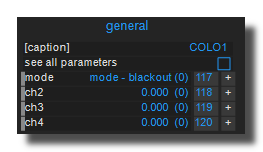
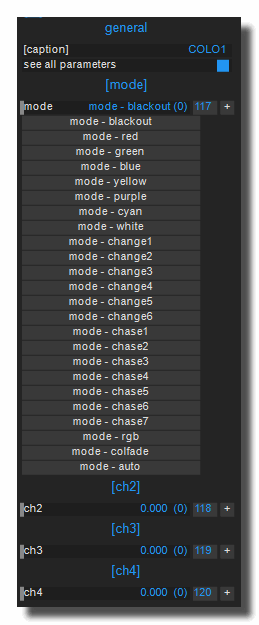
see all parameters
Determines if the range values of dmx channels are visible and if each possible value is available as an independent parameter.
| item's range value hidden | item's range value visible |
|---|---|
 |
 |
reset parameters
Reset all parameters to their default values.
chan
DMX channel of the parameter (0 to 512). Changing the channel of the first parameter renumbers the following ones.
+
Displays extended properties for the channel.
Once expanded, you obtain something similar to:
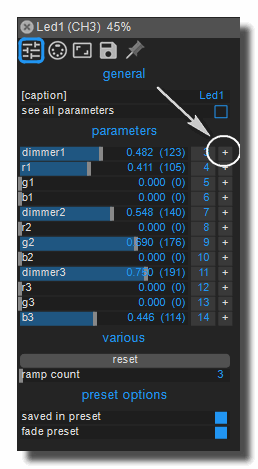 view extra parameters
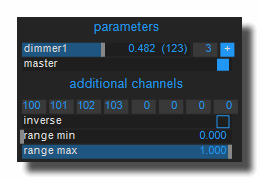 extra parameters
master
Sets this parameter as master, to be affected by the global dimmer of the master-light-panel, and fades of the grid.
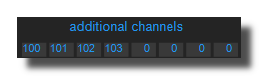
additional channels
The value of a parameter can be sent to several DMX channels at the same time (up to 8 additional channels). This is a way, for example, to turn a simple DMX-Par into a group of similar DMX-Par.
In the example above, the value of the Par dimmer is duplicated to the
100, 101, 102, 103DMX channels.mapping inverse
The value of the Parameter is inverted, goes from 100% to 0%.
mapping range min
Mapping range minimum value (0 to 1). The output value cannot be lower than this value.
mapping range max
Mapping range maximum value (0 to 2, default 1). The output cannot be higher than this value. Above 1, the output reaches its maximum before the end of the parameter's course.
reset
Resets all channels of the fixtures.
ramp count
This parameter sets the number of times this fixture is duplicated to create a fixture's ramp (1 to 512).
file
Channels description of the fixture. See create Fixtures below.
saved in preset
Determines if parameters of this object are saved in the preset-panel.
fade preset
Parameters of the this object can cross faded when you recall a preset in the grid.
Optional setting, does not appear on all objects.
fade preset
Parameters of the this object can cross faded when you recall a preset in the grid.
Optional setting, does not appear on all objects.
Toolbar
toolbar-preset
 Opens/closes the preset panel.
Create Fixtures
If some fixtures definitions are missing in the list available in Usine, you can easily create your own files (extension .dmx). Fixtures files are compatible with DMXIS fixtures definitions and are stored in text files UTF8. See dmxis-fixture-editor.
Special parameters names :
- 'R', 'G', 'B', 'Red', 'Green', 'Blue' are recognized as a set of RGB colors.
- 'pan','panf' are recognized as a 16bits parameters.
- 'tilt','tiltf' are recognized as a 16bits parameters.
- more generally, a channel is joined to the previous one as a 16bits parameter when its name is the previous name followed by 'f', or contains the previous name and 'fine' or 'low'.
For example:
Red
V,0,255,
Green
V,0,255,
Blue
V,0,255,
Macro
V,0,255,
Strobe
V,0,255,
Program
S,0,35,Off
S,36,71,Prog1
S,72,107,Prog2
S,108,143,Prog3
S,144,179,Prog4
S,180,251,Prog5
S,252,255,Sound
Dimmer
D,0,255,
See https://www.dmxis.com/tag/fixture-editor/
Each DMXIS fixture file contains a simple list of channels. Each channel in turn contains a number of ranges covering 0-255 (the range of possible DMX values).
For example, a 3 channel fixture with Pan/Tilt/Speed channels might look like this:
Pan
V,0,255,
Tilt
V,0,255,
Speed
V,0,255,- Each range contains the fields type, min, max, label
- Type can be V (variable), S (static), D (dimmer) or B (blackout)
- Variable ranges are displayed as a percentage under the DMXIS slider
- Static ranges only display a label under the DMXIS slider.
- Only Dimmer ranges will react to the DMXIS Master Level control.
- Blackout values are automatically loaded for that fixture when the DMXIS Master Level control is set to minimum.
- If the label is blank (as above) we only see a percentage displayed under the fader.
- Static ranges always need a label (or you will see an empty label under the slider!)
You can mix static & variable ranges in one channel. This is necessary, as manufacturers often squeeze lots of features into a single channel:
Gobo
S,0,30,Closed
S,31,60,Circle
S,61,90,Tunnel,
S,91,120,Open,
V,121,255,Spin
See also
- Master Light Panel
- Fixtures Group Panel
- Plot Panel
- Fixture Panel
- Light RGB Chaser
- Light Random RGB LED Color
- Light Envelop Chaser
- Light Random Peak Chaser
- Light MIDI to Dimmer (SUB-PATCH)
- Setup tab Light
- Tutorial : Pixel Mapping
- Tutorial : The Light Engine
- Light
- Light Direct ArtNet sACN Array
- Light Send Channel Name
- Light ArtNet sACN Input
- Light Direct DMX Array
- Light Plot Channels List
- Light Color Array to ArtNet
- Light Fixture
- Light Clear Channel
- Light Direct DMX Channel
- Video to Color Array
- Video to Data Array
- Video Pixel Mapper
- Color Array to Video
- Array Chaser
- Usine Master Light Settings
- Bus Set DMX
- Bus Get DMX
version 7.0.250921
Edit All Pages