Master Synchro Panel
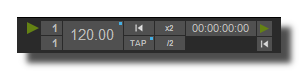
This panel drives the tempo and main Usine's synchronizations.
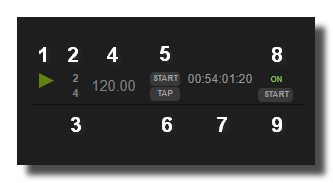
- Main synchro engine On/Off
- Cycle position
- Total bar position
- Tempo
- Restart
- Tap
- Timecode
- Activate/deactivate timecode
- Restart timecode from 00:00:00:00
on-off
 Switches ON or OFF the synchronization.
tempo
Global tempo of Usine. The tempo value can be set to any value from 0.001 to Billions of Billions bpm but the display range is limited.
Its range can be modified in the settings panel:
- Normal scale: from 30 to 300 bpm.
- Large scale: from 1 to 800 bpm.
more
Display more controls in the panel.
cycle trigger
Sens a 1 at the beginning of each cycle.
bar trigger
Sens a 1 at the beginning of each bar.
beat trigger
Sens a 1 at the beginning of each beat.
8 trigger
Sens a 1 at the beginning of each 8th.
16 trigger
Sens a 1 at the beginning of each 16th.
cycle position
This indicates the current position in the cycle.
bar position
This indicates the current position in the bar.
beat position
This indicates the current position in the beat.
8 position
This indicates the current position in the 8th.
16 position
This indicates the current position in the 16th.
cycle length
Duration of the cycle in milliseconds.
bar length
Duration of the bar in milliseconds.
total bar position
This indicates the total bar position (from the start of the synchro).
cycle ppq pos
PPQ position in the cycle.
total ppq
This indicates the total bar position.
nb beat per cycle
Number of beats in the cycle
synchro restart
Restarts the synchronization from the beginning of the cycle.
tap
Enables you to adjust the tempo by successive taps.
average of the last taps, at least 3 taps.
reset tap
Reset the tap counter in order to enter a new tap tempo.
x
Multiplies the current tempo by 2.
Not visible by default.
/
Divides the current tempo by 2.
Not visible by default.
timecode
Current timecode.
timecode on
Activate/deactivate the timecode.
timecode restart
restart the timecode from the beginning.
restart timecode
Restart the timecode form 00:00:00:00.
Settings
saved in preset
Determines if parameters of this object are saved in the preset-panel.
fade preset
Parameters of the this object can cross faded when you recall a preset in the grid.
Optional setting, does not appear on all objects.
fade preset
Parameters of the this object can cross faded when you recall a preset in the grid.
Optional setting, does not appear on all objects.
bar list
List of bars with their time signature for the cycle. A cycle can be made of several bar with different time signatures.
for example:
4/4
4/4
3/4
Represents a cycle of two 4/4 bars and a 3/4 bar, so 11 beats. Allowed time signatures are x/1, x/2, x/4, x/8, x/16.
Moreover, you can define a precise tempo for each bar, for example
4/4=120
3/8=90
7/4=100
The first 4/4 bar will be at tempo=120, the second 3/8 at 90 and so on.
large scale
Lets you use a tempo display range from 1 to 800 bpm.
frame rate
Sets the timecode frame rate.
start main engine on receive
When ON, main process engine is started automatically when a timecode or MTC is received.
offset
Timecode offset to apply. TIMECODE = TIMECODE-received + OFFSET
ustomize Interface Choose which elements are visible in the panel.
- show on-off
- show tempo
- show timecode
- show cycle position
- show bar position
- show restart
- show mult2 button
- show div2 button
- show tap tempo button
See also
- Master Synchro Panel
- Top Header Panel
- Master Light Panel
- Master Panel
- Usine Master Light Settings
- Usine Master Settings
- Usine Master Vu Meters
- Synchro
- Synchro Quantize Data
- Synchro Idle Clock
- Synchro Local
- Synchro Tempo to Delay
- Synchro Clock Divider
- Synchro Master
- Synchro Quantize MIDI
- Synchro Swing Trigger
- Synchro Quantize Trigger
- Synchro Clock
version 7.0.250921
Edit All Pages