Data Generator Random Law (SUB-PATCH)
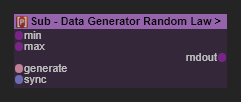
Generates random numbers between min and max according to a distribution law that you draw on its panel: the values where the curve is high come out more often than the values where it is low. A new value comes each time generate receives a trigger, or continuously at the data rate, depending on sync.
The law is drawn in an array-display and the values are computed by a script module.
In the browser: tab modules, All Modules > Data > Generators > Data Generator Random Law.
Settings
min
Lowest value of the random numbers.
max
Highest value of the random numbers.
generate
Draws a new random value when it receives a trigger. Only when sync is set to button.
sync
How the new values are produced:
- button: a new value each time generate receives a trigger or its button is clicked.
- data rate: a new value at each calculation block of Usine (typically every 3 ms), following the drawn law.
rndout
The random value, between min and max.
Panel
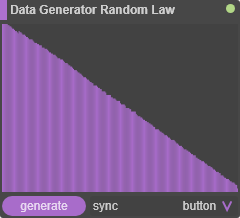
The panel also holds the generate button and the sync list described above.
law
The drawing area at the top of the panel: draw the distribution law with the mouse, from min on the left to max on the right. The higher a part of the curve, the more often the values of that part come out.
See also
- Data Manipulation Calc Min (SUB-PATCH)
- Multi Knob (SUB-PATCH)
- MIDI Send All Notes OFF (SUB-PATCH)
- Data Manipulation Hysteresis (SUB-PATCH)
- Light MIDI to Dimmer (SUB-PATCH)
- Empty Sub-Patch (SUB-PATCH)
- Phase Voc Forward (SUB-PATCH)
- Audio Analysis Beat Follower Threshold (SUB-PATCH)
- Data Generator Random Integer (SUB-PATCH)
- MIDI Delay Feedback Pitch (SUB-PATCH)
- Audio Analysis Beat Follower (SUB-PATCH)
- Generalized VBAP 2D (SUB-PATCH)
- MIDI Freez (SUB-PATCH)
- Color Spectrum (SUB-PATCH)
- Data Manipulation Rec XY (SUB-PATCH)
- Phase Voc Inverse (SUB-PATCH)
- Data Manipulation Local Max (SUB-PATCH)
- Data Manipulation Calc Max (SUB-PATCH)
- Data Manipulation Local Min (SUB-PATCH)
- Data Generator Random Law (SUB-PATCH)
- Create Sub-Patches
version 7.0.250921
Edit All Pages