Video Shaders FX
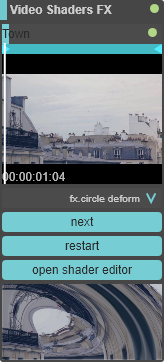
Transforms a video with OpenGL effect shaders chosen in a list. The video comes from the video player of the control panel (Town.mp4); the patch has no video input.
The video-player module feeds the inputImage of the video-opengl-shader module, which plays the shader selected in the list of a file-lister (folder Resources/Medias/Shaders/fx). The result goes to the next patch of the rack (or the rack output).
Each shader adds its own settings as inlets of the shader module, inside the patch: level, offset... for fx.circle deform.
Press next and watch the image under the controls.
In the library: 3-Video.
Settings
video player
Panel of the video player that gives the video to transform: it shows the name of the file played (Town).
shader
The list under the video player: chooses the effect shader among the 20 files of the fx folder:
- fx.3d matrix
- fx.ascii art
- fx.bezier displace
- fx.circle deform
- fx.collage
- fx.color adjust
- fx.edge blending
- fx.four raws
- fx.fragment raws
- fx.gamma correction
- fx.ghost
- fx.hsl to rgb
- fx.mouse smoke
- fx.multi color level
- fx.rotate
- fx.sepia
- fx.sphere map
- fx.trapeze
- fx.tv
- fx.vignette
next
Selects the next shader of the list.
restart
Starts the shader again from its beginning.
open shader editor
Shows the code of the shader, to change it.
video out
The transformed image, shown under the controls.
See also
version 7.0.250921
Edit All Pages