Video Global Editor
A chain of video modules to correct and place the image, set in one window with a preview: negative, brightness, contrast, flips, crop, red, green and blue, intensity, size, rotation, zoom and position. The control panel holds only the EDIT button that opens this window.
The video comes from the previous patch of the rack (or the rack input) and goes through the modules in this order: negative, brightness, contrast, Flip H, Flip V, Crop H, Crop V, R G B, intensity, width and height, rotation, scale, pos x and pos y. The result goes to the next patch of the rack (or the rack output). A module whose controls are at their neutral value is bypassed to save CPU. The chain uses, among others, the video-mapping-crop, video-geometric-resize and video-mapping-scale modules.
In a rack, put it after the Video Player patch (3-Video), drop a video out device in the rack output, then click EDIT.
In the library: 3-Video.
Settings
EDIT
Opens the window with all the settings and a preview.
Settings window
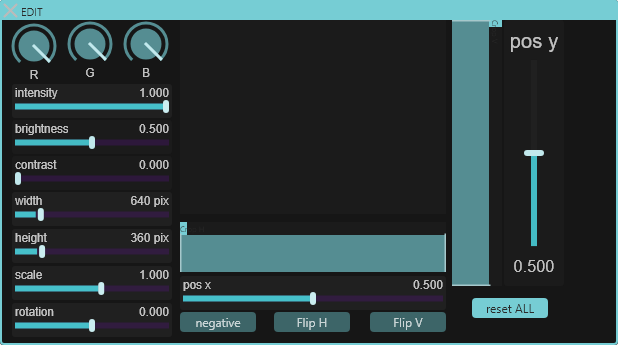
Click EDIT to open this window.
R
Amount of red in the image, from 0 to 1: 1 keeps the red unchanged, 0 removes it.
G
Amount of green in the image, from 0 to 1: 1 keeps the green unchanged, 0 removes it.
B
Amount of blue in the image, from 0 to 1: 1 keeps the blue unchanged, 0 removes it.
intensity
Intensity of the image, from 0 to 1: 0 gives black, 1 leaves the image unchanged.
brightness
Brightness of the image, from 0 to 1: 0 gives black, 0.5 leaves the image unchanged, 1 gives white.
contrast
Contrast increase, from 0 to 1: 0 leaves the image unchanged, 1 doubles the contrast.
width
Width of the output image, from 10 to 4096 pixels. It is set to the width of the incoming video.
height
Height of the output image, from 10 to 2160 pixels. It is set to the height of the incoming video.
scale
Size of the image, from 0 to 10 (logarithmic fader): 1 is the original size, 0.5 half the size, 2 twice the size.
rotation
Rotation of the image, from -1 to 1: 0 gives no rotation, -1 and 1 a full turn in each direction.
preview
The image at the top of the window: preview of the video.
Crop H
The range fader under the preview: horizontal part of the image that is kept, between the two ends of the range, from 0 (left) to 1 (right). The whole range keeps the whole image.
pos x
Horizontal position where the center of the image goes, from -0.5 to 1.5: 0.5 is the center of the frame.
negative
Inverts the colors of the image (negative image).
Flip H
Flips the image horizontally (left and right are swapped).
Flip V
Flips the image vertically (upside down).
Crop V
The vertical range fader at the right of the preview: vertical part of the image that is kept, between the two ends of the range. The whole range keeps the whole image.
pos y
Vertical position where the center of the image goes, from -0.5 to 1.5: 0.5 is the center of the frame.
reset ALL
Resets every setting of the window.
See also
version 7.0.250921
Edit All Pages