Video Recorder
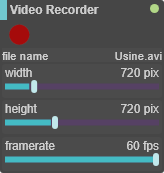
Records the incoming video in a file (avi, mp4, mov...) with a record switch. The file goes to your Videos folder (the path of the recorder module inside the patch).
The video comes from the previous patch of the rack and goes into the video-recorder module. The patch has no video output. The settings are read when the recording starts.
In a rack, put it after the Video Player patch (3-Video), switch record ON for a few seconds, then OFF.
In the library: 3-Video.
Settings
record
The red round switch. ON starts the recording, OFF stops it and closes the file.
file name
Name of the recorded file (Usine.avi by default). Its extension gives the format: .avi here, .mp4 or .mov for H.264, the recommended formats. The video-recorder page lists all the formats.
width
Width of the recorded video, from 50 to 3840 pixels.
height
Height of the recorded video, from 50 to 2160 pixels.
framerate
Framerate of the recorded video, from 10 to 60 fps. Set it to the real framerate shown on the recorder module inside the patch.
See also
version 7.0.250921
Edit All Pages