Video Player
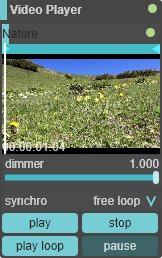
Plays a video file (Nature.mp4) with play, stop, pause, loop and synchronization controls. Drop video files on the player in the control panel to add them to it.
The patch is built on the video-player module. Its video goes to the next patch of the rack (or the rack output); the video coming from the previous patch also goes to the output.
In a rack, drop a video out device in the rack output, switch play loop OFF, then press play and stop.
In the library: 3-Video.
Settings
video player
Panel of the video player: it shows the name of the file played (Nature). Drop video files on it to add them to its list.
dimmer
Intensity of the video, from 0 to 1: 0 gives black.
synchro
When the file restarts:
- free loop: the file plays in loop, without synchronization.
- cycle, bar, beat, 8th, 16th: the file restarts at each cycle, bar, beat, eighth note or sixteenth note.
- 2 bars, 4 bars, 6 bars, 8 bars, 10 bars, 12 bars, 14 bars, 16 bars: the file restarts every 2 to 16 bars.
- loop on bar: the file plays to its end, then restarts at the beginning of the next bar.
- loop on beat: the file plays to its end, then restarts at the beginning of the next beat.
play
Plays the file. Works when play loop is OFF.
stop
Stops the file. Works when play loop is OFF.
play loop
ON: plays the file in loop.
pause
Pauses the playing without going back to the beginning.
See also
version 7.0.250921
Edit All Pages