MOGGER Reverb
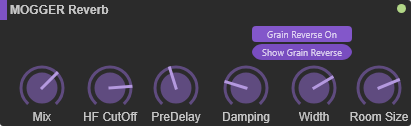
Stereo reverb (Freeverb model) with a low pass filter and a pre-delay before it, and a 75 Hz low cut (audio-filter-linkwitz-riley) after it. With Grain Reverse On, the GRAIN Reverse sub-patch records short buffers of the input and plays them backwards into the reverb.
The audio inputs 1-2 go through GRAIN Reverse, the low pass filter, an audio-delay (pre-delay) and the reverb, then the low cut; a crossfade mixes the dry sound and the reverb to the audio outputs 1-2.
Play a drum loop, raise Room Size, then switch Grain Reverse on and off.
In the library: 1-Audio > Audio FX > Mogger.
Settings
Grain Reverse On
Switches the GRAIN Reverse effect ON or OFF (the caption reads Grain Reverse Off when it is OFF).
Show Grain Reverse
Opens the window of the GRAIN Reverse settings (see below).
Mix
Balance between the dry sound and the reverb, from 0 (dry only) to 1 (reverb only).
HF CutOff
Cutoff frequency of the low pass filter before the reverb, from 200 to 20000 Hz. At 20000 Hz, no low pass.
PreDelay
Time before the reverb starts, from 0 to 200 ms. At 0, no pre-delay.
Room Size
Length of the reverb tail, from 0.1 to 99.9 %.
Damping
Darkens the reverb tail, from 0 to 100 %.
Width
Stereo separation of the reverb, from 0 to 100 %.
GRAIN Reverse window
Click Show Grain Reverse to open this window.
reverse
Plays the grains backwards.
grain size
Size of the grains, from 1 to 1000 ms.
speed
Playing speed of the grains, from 1 to 100 %.
pitch
Transposition of the grains, from -12 to 24 semitones.
buffer size
Length of the buffers recorded from the input.
Volume
Level of the GRAIN Reverse sound, from -80 to 0 dB.
See also
version 7.0.250921
Edit All Pages