MOGGER MurF
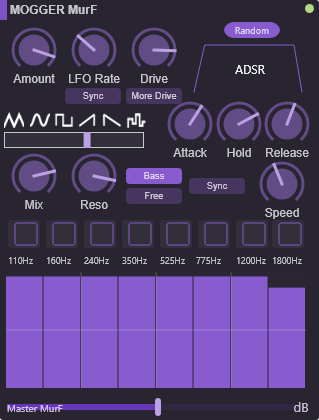
Multiple resonance filter in the style of the Moogerfooger MuRF. After a drive, 8 resonant band filters play a step pattern: on each step, the bands set in the pattern open with an envelope (Attack, Hold, Release). An LFO moves the band frequencies.
The audio inputs 1-2 are mixed to mono, go through an audio-disto-wave-shaper, then the 8 band filters, spread in stereo, and an audio-dynamics-limiter. A crossfade mixes the dry sound and the filtered sound to the audio outputs 1-2. The patterns are chosen and edited in the settings window.
Play a drum loop and pick another pattern in the settings window.
In the library: 1-Audio > Audio FX > Mogger.
Settings
Amount
Depth of the LFO on the band frequencies, from 0 to 10.
LFO Rate
Speed of the LFO, from 0.1 to 25 Hz. When the Sync under it is ON, it is replaced by a knob in tempo divisions, from 0 to 7.
Drive
Amount of distortion before the filters, from 0.99 to 100.
Random
Gives random values to the controls.
ADSR
The curve at the top right: shape of the step envelope set by Attack, Hold and Release.
Sync
Two switches:
- under LFO Rate: ON, the LFO follows the tempo.
- next to Speed: ON, the steps follow the tempo; Speed is replaced by Rate, in tempo divisions from 0 to 7.
More Drive
Adds more distortion.
LFO shapes
Shape of the LFO: click one of the six shape icons, or move the slider under them (from 1 to 6).
Attack
Attack time of the step envelope, from 0.1 to 800 ms.
Hold
Hold time of the step envelope, from 0.1 to 295.5 ms.
Release
Release time of the step envelope, from 0.1 to 800 ms.
Mix
Balance between the dry sound and the filtered sound, from 0 (dry only) to 1 (filtered only).
Reso
Resonance of the band filters, from 0 to 300.
Bass / Mids
Frequency range of the 8 bands: Bass from 110 to 1800 Hz, Mids from 200 to 3400 Hz.
Animated / Free
How the band levels move: Animated, an LFO moves them; Free, you set them by hand.
Speed
Step rate, from 0.1 to 10. Shown when the Sync next to it is OFF.
led
Eight lights, one per band, above the band frequencies.
band frequencies
The labels under the lights: the frequency of each band (110Hz to 1800Hz with Bass).
band levels
The 8 bars: the level of each band, from -25 to 1 dB.
Master MurF
Output level of the filters, from -10 to 10 dB.
Settings window
advanced settings
 Use this icon in the patch header to open these advanced settings. Like the other icons of the header, it shows when the mouse is over the control panel of the patch (the green dot, always shown, turns the patch ON or OFF).
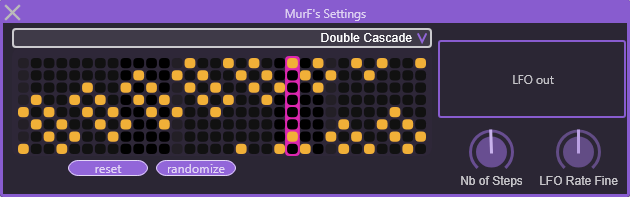
The window is titled MurF's Settings.
select
Step pattern:
- nothing
- Upward Staircase
- Downward Cascade
- Crisscross
- Tremolo
- Upward Bounce
- Brownian Motion
- Random Like
- Double Up And Down
- Downward Band Expansion
- Polyrhythm
- Rhythmicon
- Downward Staircase
- Upward Cascade
- Down And Up
- Come Together
- Seesaw Panner
- Rising Falling
- Pulsar
- Upward Notch
- Growing And Shrinking Band
- Double Cascade
- Inverted Rhythmicon
- Stereo Pyramid
- Perpetual Motion
- Double Dip
- Breakbeat
- Big Beat
- Rhythmik
- Free
step matrix
The pattern: one column per step, one line per band. A lit cell opens its band on that step. Click the cells to edit the pattern. The framed column is the current step.
reset
Clears the step matrix.
randomize
Fills the step matrix at random.
LFO out
View of the LFO over time.
Nb of Steps
Number of steps of the pattern, from 1 to 64.
LFO Rate Fine
Fine tuning of the LFO speed, from -0.1 to 0.1 Hz.
See also
version 7.0.250921
Edit All Pages