8ANA 8NUM Receiver
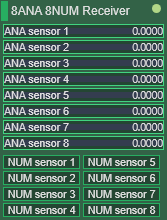
Receiver for the Interface Z 8ANA 8NUM board: the 8 analog (ANA) and 8 digital (NUM) inputs of the board arrive as MIDI and move the faders and switches of the panel.
The board must be the MIDI input of the rack (any MIDI channel). A midi-filter-multi module picks the messages of the board:
- ANA 1 to 8: CC 32 to 39 (128 steps). With 4096steps ON, CC 40 to 47 add the low part of the value (0 to 4095, 12 bits).
- NUM 1 to 8: notes 0 to 7 (note ON: 1, note OFF: 0).
The faders and switches are also the outputs of the patch: wire their outlets in the patch editor to use the sensor values elsewhere.
Without the board, turn a MIDI knob that sends CC 32 on any channel: ANA sensor 1 follows.
In the library: 5-Data > Sensors > Interface Z.
Settings
ANA sensor
Value of an analog input of the board, from 0 to 1. There are 8 ANA sensor faders, one per analog input.
NUM sensor
State of a digital input of the board: ON (1) or OFF (0). There are 8 NUM sensor switches, one per digital input, in two columns (1 to 4 on the left, 5 to 8 on the right).
Settings window
advanced settings
 Use this icon in the patch header to open these advanced settings. Like the other icons of the header, it shows when the mouse is over the control panel of the patch (the green dot, always shown, turns the patch ON or OFF).

4096steps
Resolution of the analog inputs. Set it ON when the board sends 12-bit values (0 to 4095): the patch then reads the low part of each value on CC 40 to 47. OFF (the switch shows 128steps), the analog values have 128 steps (CC 32 to 39).
See also
version 7.0.250921
Edit All Pages