Midi to DMX
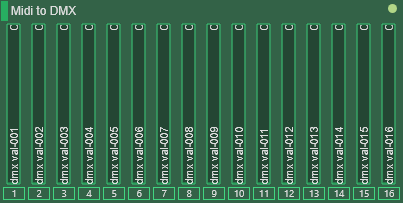
16 DMX faders for an Interface Z MIDI to DMX board: each fader (0 to 255) is sent as MIDI control changes to the DMX channel set in the number box under it (1 to 512).
The faders are the voices of a polyphonic sub-patch, and midi-generator-create modules make the control changes. Two ways to code the DMX values, set by 1midi 1dmx in the settings window:
- 1midi 1dmx ON: one control change per DMX channel, with the value / 2. 128 DMX channels per MIDI channel, from the first channel set by midi chan.
- OFF (2midi 1dmx): two control changes per DMX channel, the even one for 0 to 127 and the odd one for 128 to 255. 64 DMX channels per MIDI channel.
The board must be the MIDI output of the rack.
Without the board, set a MIDI monitor as MIDI output of the rack and move a fader: a control change goes out.
In the library: 5-Data > Sensors > Interface Z.
Settings
dmx val
DMX value sent to the channel set by the number box under the fader, from 0 to 255. There are 16 dmx val faders, captioned dmx val-001 to dmx val-016.
dmx chan
The number box under each fader: DMX channel of the fader, from 1 to 512. In the capture above, the 16 boxes hold the channels 1 to 16.
Settings window
advanced settings
 Use this icon in the patch header to open these advanced settings. Like the other icons of the header, it shows when the mouse is over the control panel of the patch (the green dot, always shown, turns the patch ON or OFF).
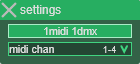
1midi 1dmx
ON: one MIDI control change per DMX channel (value / 2, 128 DMX channels per MIDI channel). OFF, the switch shows 2midi 1dmx: two control changes per DMX channel (64 DMX channels per MIDI channel).
midi chan
First MIDI channel used by the patch. Items: 1-4, 2-5, 3-6, 4-7, 5-8, 6-9, 7-10, 8-11, 9-12, 10-13, 11-14, 12-15, 13-16.
See also
version 7.0.250921
Edit All Pages