8FXs
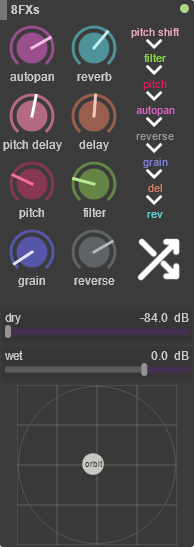
Chain of 8 audio effects played one after the other, in the order you choose: reverb, delay, reverse, granulator, pitch delay, pitch, autopan and filter. Each effect has its own dry-wet knob, and the shuffle button mixes the order of the effects and their settings at random.
The audio inputs 1-2 go through the 8 effects in the order of the slots, then through a limiter, built on the audio-dynamics-limiter module, and the wet level to the audio outputs 1-2. The dry sound is added with dry. The delays use the audio-delay module, the granulator the audio-sampler-recorder-grain module.
Play a loop, press the shuffle button a few times, then turn the knobs.
In the library: 1-Audio > Audio FX > Various.
Settings
autopan
Dry-wet of the autopan effect (the sound moves between left and right), from 0 (dry) to 1 (effect only).
reverb
Dry-wet of the reverb, from 0 (dry) to 1 (effect only).
pitch delay
Dry-wet of the pitch delay (the pitch shift slot), from 0 (dry) to 1 (effect only).
delay
Dry-wet of the delay, from 0 (dry) to 1 (effect only).
pitch
Dry-wet of the pitch effect, from 0 (dry) to 1 (effect only).
filter
Dry-wet of the filter, from 0 (dry) to 1 (effect only).
grain
Dry-wet of the granulator, from 0 (dry) to 1 (effect only).
reverse
Dry-wet of the reverse effect, from 0 (dry) to 1 (effect only).
fx
The 8 lists on the right are the 8 slots of the chain, from the first (top) to the last (bottom); the arrows show the way of the sound. Select the effect each slot holds:
- rev: reverb
- del: delay
- reverse
- grain: granulator
- pitch shift: pitch delay
- pitch
- autopan
- filter
random
The shuffle icon (two crossed arrows): mixes the order of the slots and randomizes the settings of the effects.
dry
Level of the dry sound added to the outputs, from -84 to 12 dB.
wet
Level of the effect chain, from -84 to 12 dB.
Magic pad
The round pad with the orbit point is the magic pad: it moves many settings of the patch at once, around your own settings.
- centre: every setting is at the value you gave it. Bring the point back to the centre to find your sound again.
- distance from the centre: how far the settings go from your values, from nothing at the centre to the most on the circle and beyond, in the corners. It grows with the square of the distance, so the pad is finer near the centre.
- angle: turning around the centre, from the top and clockwise, moves the settings along their orbit. Each setting follows its own smooth curve, so the combinations keep changing, and the same point always gives the same sound.
A setting changed by hand, by a preset or by an automation keeps its new value as the centre of its orbit. These values are saved with the patch.
The pad is a panel-xy-pad module read by a script module named HUE ORBIT: the table at the end of its script lists the settings it moves, their curves and how far each one moves.
Settings moved by the pad: the dry-wet knob of each effect (autopan, reverb, pitch delay, delay, pitch, filter, grain, reverse), so that the pad goes from one effect to another, and the settings of the effects in the settings window: room size and damping (REV), delay and feedback (DEL), grain size and speed (REVERSE), freq (AUTOPAN), frq and Q (FILTER), interval and duration (Granulator), delay and feedback (pitch delay).
Not moved: dry, wet, the order of the effects, the shuffle button, the lists of the settings window and the PITCH settings.
Settings window
The setup icon of the patch opens a window with the settings of the 8 effects, one zone per effect.
REV
room size
Size of the room of the reverb, from 30 to 90 %.
damping
Damping of the reverb tail, from 1 to 50.
DEL
delay
Delay time, from 3 to 500 ms.
feedback
Amount of the echoes sent back into the delay, from 0 to 95 %: the higher, the more repeats.
REVERSE
buffer size
Size of the buffer of the reverse effect, chosen in a list.
grain size
Size of the grains of the reverse effect, from 7 to 500 ms.
speed
Speed of the reverse effect, from 1 to 100 %.
PITCH
pitch
Transposition, from -12 to 12.
lantency
Latency of the pitch effect, from 2 to 30. The unit next to the value shows the resulting latency in ms.
free / scaled
Pitch mode: free or scaled.
+-1 octave / +- 2 octave
Range of the transposition: one or two octaves up and down.
AUTOPAN
freq
Rate of the autopan, from 0.1 to 5 Hz.
FILTER
frq
Cutoff frequency of the filter, from 200 to 10000 Hz.
Q
Resonance of the filter, from 1 to 12.
type
Type of the filter, chosen in a list.
Granulator
interval
Time between two grains, from 0 to 200 ms.
duration
Length of each grain, from 0.3 to 200 ms.
grain env
Envelope of the grains, chosen in a list.
pitch delay
feedback
Feedback of the pitch delay, from -20 to -1 dB.
delay
Delay time, from 0 to 2000 ms.
pitch
Transposition of the delayed sound, from -48 to 48.
See also
version 7.0.250921
Edit All Pages