SYNTH Tea Organ
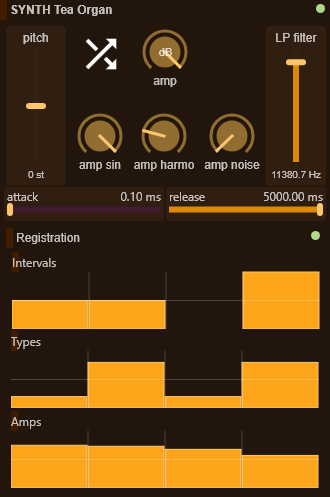
Small organ played by MIDI notes, based on the organ registration principle: each note plays 4 stops (oscillators) whose interval, waveform and level you draw in the Registration panel.
Each voice plays its 4 stops with audio-oscillator-digital modules; amp sin, amp harmo and amp noise scale the 3 families of waveforms. An audio-envelope-adsr (attack, release) and the velocity shape each note. Then come a low cut at 50 Hz, amp with a tremolo (modulation wheel or modulation), the stereo fx, the LP filter and a limiter. MIDI in; the audio outputs are 2 channels. pitch and the pitch bend are in halftones.
Play chords on a MIDI keyboard, then click the randomize icon.
In the library: 1-Audio > Audio Synthesis.
Settings
pitch
Transposition of the organ, from -24 to 24 halftones (st). The range of the pitch bend is set by pitch bend width in the settings window.
randomize patch

The shuffle icon: draws random settings for the whole patch, except Amps, glide, modulation, polyphonic/monophonic and stereo fx.
amp
Output volume, from -80 to 0 dB. The tremolo acts on it.
amp sin
Level of the sine stops, from 0 to 1.
amp harmo
Level of the square, triangle and saw stops, from 0 to 1.
amp noise
Level of the white noise stops, from 0 to 0.5.
LP filter
Cutoff frequency of the output low pass filter, from 80 to 18000 Hz.
attack
Attack time of the notes, from 0.1 to 2000 ms.
release
Release time of the notes, from 10 to 5000 ms.
Registration
The 4 columns of each array are the 4 stops of the organ: draw the values with the mouse.
Intervals
Interval of each stop from the played note, from -3 to 3:
- -3: -12 halftones (octave down)
- -2: -7 halftones (fifth down)
- -1: -3 halftones
- 0: the played note
- 1: +3 halftones
- 2: +7 halftones (fifth up)
- 3: +12 halftones (octave up)
Types
Waveform of each stop, from 0 to 5:
- 0 and 1: sine
- 2: white noise
- 3: square
- 4: triangle
- 5: saw
Amps
Relative level of each stop, from 0.1 to 1.
Settings window
advanced settings
 Use this icon in the patch header to open these advanced settings. Like the other icons of the header, it shows when the mouse is over the control panel of the patch (the green dot, always shown, turns the patch ON or OFF).
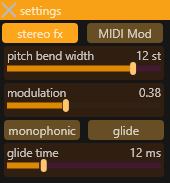
stereo fx
ON: a stereo effect made of delays widens the sound.
MIDI Mod
ON: the tremolo follows the modulation wheel of your MIDI controller. OFF: you set it with modulation.
pitch bend width
Range of the pitch bend, from 1 to 24 halftones (st).
modulation
Amount of the tremolo, from 0 to 1, when MIDI Mod is OFF.
polyphonic
ON (polyphonic): several notes play at the same time. OFF (monophonic): one note at a time, with glide.
glide
ON: the pitch glides from one note to the next. Shown in monophonic mode.
glide time
Duration of the glide, from 10 to 750 ms. Shown in monophonic mode.
See also
version 7.0.250921
Edit All Pages