Audio Envelope ADSR
ADSR envelope generator module. Works as data envelope generator or as an audio envelope modifier.
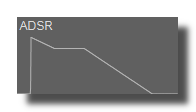
See ADSR wikipedia page for more info.
Settings
query
Number of audio channels, asked when the module is created (1 = mono, 2 = stereo, up to 192). Each channel is processed independently and the module exposes one in N / out N pair per channel: with 1 channel only in 1 and out 1 exist.
Choose the number of channels actually carried by the signal. A mono source feeds a 1-channel module; duplicate the signal only where a stereo output is needed. To change the number of channels afterwards, recreate the module: the query is asked again and the connections are restored by name.
Here the query also accepts 0 channels: the module then has no audio inlet or outlet and only generates the data envelope.
bypass
Bypasses the module processing when activated (ON).
- OFF (0): Module processes normally
- ON (1): Input passes directly to output without processing
in
Audio input flow(s).
visible only if number of audio inputs is > 0
out
Audio output flow(s).
visible only if number of audio outputs is > 0
attack time
Attack time in ms.
Range [0..20000] ms (log scale), default 5 ms.
decay time
Decay time.
Range [0..20000] ms (log scale), default 20 ms.
sustain time
Sustain duration.
only active when the envelop is triggered with the trigger input.
Range [0..20000] ms (log scale), default 0 ms.
sustain level
Sustain level.
Range [0..1], default 0.8.
release time
Release time in ms.
Range [0..20000] ms (log scale), default 100 ms.
return to zero
Forces the envelope to return to 0 each time it is generated if ON. Otherwise, if OFF (default), the new envelope restarts at the current value.
inverse
Inverts the envelope output (1 - envelope). The audio then passes while the envelope is idle and is cut while it plays.
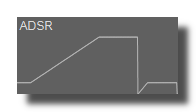 inverse
smooth
Determines if the volume or envelop changes smoothly (ON), or abruptly (OFF).
smooth speed
Smooth speed, only if smooth is ON. Fast value can produce audio glitches.
- fast
- medium
- medium slow
- slow
- very slow
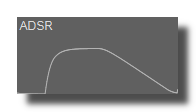 smoothed
shape
Global curve shape applied to the envelope values (default linear).
- linear: no change.
- exponential: slow start, fast end.
- logarithmic: fast start, slow end.
- quarter sine: quarter of a sine curve, fast start.
- constant energy: raised cosine
(1 - cos(π x)) / 2, slow at both ends. - square root: square root of the value.
- square: square of the value.
- S-curve: smoothstep
x² (3 - 2x), slow at both ends.
play
Plays the envelop.
The envelope then stays at the sustain level until stop.
stop
Stops the envelope: the release phase starts.
trigger
Plays the envelope and stops it (with the release time) after attack, decay and sustain time.
For example with attack 10 ms, decay 50 ms and sustain time 200 ms, the release starts 260 ms after the trigger.
envelope
Envelope output in the range [0..1].
is playing
Send 1 when the envelope is currently playing (envelope value above 0). While it is 0 the audio outputs are silent.
Common Settings
info
show manual
Button. Opens the manual page of the selected object (or of its parent module for a control) in the web browser. If no page exists for this object, an error is traced in the trace panel.
For more details about information/help creation, see create-help-file.
description
Free multi-line text attached to the module, saved with the patch. When it is not empty, it is shown as the hint of the module (mouse over the module header in the patch) in place of the default module hint, even when the module hints are disabled.
ID's
visible only in god mode, see setup-panel-tab-expert.
unique ID
Read-only, not saved. Current private numeric ID of the object, used internally to identify it (for example as the target of a bind ID).
preset ID
Read-only, not saved. Private ID used to store and recall the values of this control in presets.
recreate ID
Button. Generates a new unique ID, original ID and preset ID for the object. Use it if you experience difficulties in Polyphonic mode or if two objects share the same ID. Preset values and binds referring to the old IDs are lost.
Object Remote Address
absolute
Read-only, not saved. Absolute address of the object in the Usine objects tree, built from the workspace root. This is the address to use to reach the object from scripts, the objects panel or remote messages. Only shown for objects that are registered in the objects list. See objects-address.
local
Read-only, not saved. Address of the object relative to the current patch, valid inside that patch only. See objects-address.
user addr
Free user-defined address for the object (empty by default). When set, the object is also registered in the objects tree under this name, so it can be reached independently of its position in the workspace (the value is also reported in the mouse-over and mouse-down chunks). Changing it rebuilds the objects list. Only available on objects that support a user address. See objects-address.
See also
version 7.0.250921
Edit All Pages