SURR PAN Trajectory
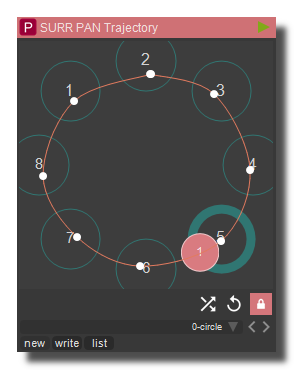
Surround panner with a drawn path: a mono sound travels around up to 8 speakers along a trajectory that you draw.
The panel-draw-trajectory-spline holds the path (the orange curve, shaped by its control points). A ramp runs a cursor along it again and again; the smoothed position of the cursor is the source of the audio-pan-surround-panner. The audio input is 1 channel; the 8 audio outputs feed the speakers.
Click randomize, then lower speed in the settings window for a faster movement.
In the library: 1-Audio > Audio Surround.
Settings
trajectory
The path of the sound: the orange curve. Drag its control points (white dots) to change it.
panner
The speakers (circles, numbered like the audio outputs) and the source (the dot that moves along the path). When lock is OFF, you can move the speakers.
randomize
The shuffle icon: draws a random path.
clear
The circular arrow icon: erases the path.
lock
The padlock icon: ON, the speakers stay in place. OFF, you can move them.
Settings window
advanced settings
 Use this icon in the patch header to open these advanced settings. Like the other icons of the header, it shows when the mouse is over the control panel of the patch (the green dot, always shown, turns the patch ON or OFF).
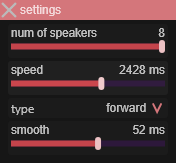
num of speakers
Number of speakers, from 1 to 8.
speed
Time of one pass along the path, from 0 to 20000 ms: the lower, the faster the movement.
type
Direction of the movement along the path:
- forward
- backward
- round trip: forward, then backward.
smooth
Smoothing of the position of the source, from 0 to 500 ms.
See also
version 7.0.250921
Edit All Pages