SURR PAN Simple
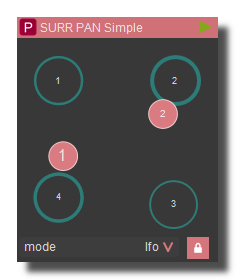
Surround panner: it moves 1 or 2 sound sources between up to 8 speakers, by hand, at random, with the physics engine or with LFOs.
The audio-pan-surround-panner shows the speakers (circles) and the sources (numbered dots): the closer a source is to a speaker, the louder it is in that output. The audio inputs 1-2 are the two sources (one channel each); the 8 audio outputs feed the speakers. The random moves come from data-generator-random and the turns from data-generator-lfo.
Set mode to simple and drag the sources between the speakers. Then wire the outputs 1 to 4 to 4 speakers of your audio interface.
In the library: 1-Audio > Audio Surround.
Settings
panner
The speakers (circles, numbered like the audio outputs) and the sources (numbered dots). In simple mode, drag the sources with the mouse. When lock is OFF, you can also move the speakers.
mode
How the sources move:
- simple: you drag the sources by hand.
- random: the sources move at random (speed set by random speed).
- physics: the physics engine moves the sources (speed set by physics speed).
- lfo: LFOs turn the sources (settings LFO type, LFO freq, LFO distance, LFO inverse).
lock

The padlock icon: ON, the speakers stay in place.
Settings window
advanced settings
 Use this icon in the patch header to open these advanced settings. Like the other icons of the header, it shows when the mouse is over the control panel of the patch (the green dot, always shown, turns the patch ON or OFF).
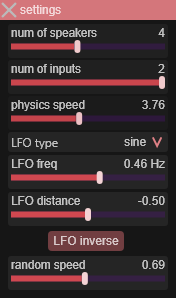
num of speakers
Number of speakers, from 1 to 8.
num of inputs
Number of sources (audio inputs), 1 or 2.
physics speed
Speed of the physics engine, from 0 to 100. Used in physics mode.
LFO type
Waveform of the LFOs that turn the sources in lfo mode: sine, triangle, rectangle...
LFO freq
Frequency of the LFOs, from 0.01 to 4 Hz.
LFO distance
Distance between the two sources, from -1 (opposite positions) to 0 (same position).
LFO inverse
Reverses the direction of the LFOs.
random speed
Speed of the random moves, from 0 to 1. Used in random mode.
See also
version 7.0.250921
Edit All Pages