SURR Matrix 8
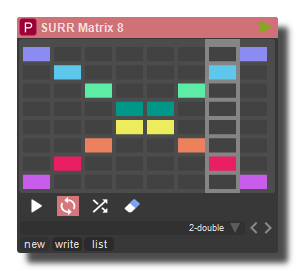
Surround step matrix: a mono sound moves from speaker to speaker, step by step in time with the tempo, following the cells you switch on in a matrix (up to 8 speakers).
Each line of the panel-matrix is an output (a speaker), each column a step. A synchro-clock moves the cursor one column at each synchro tick (a beat by default); the cells ON in that column open their outputs, faded in and out by attack time and release time. The audio input is 1 channel. The audio output N plays the line N of the matrix (line 1 at the top): wire 8 speakers in the order the sound should travel.
Play a long sound: it turns around the 8 speakers. Then click randomize.
In the library: 1-Audio > Audio Surround.
Settings
matrix
The step matrix: one line per output (speaker), one column per step. Click a cell to switch it ON or OFF: when the cursor reaches its column, the sound plays on the output of its line.
play
The play icon: sends the cursor back to column 1.
loop
The loop icon: ON, the num of columns steps repeat.
randomize
The shuffle icon: sets the cells of the matrix at random.
reset
The eraser icon: clears the matrix.
Settings window
advanced settings
 Use this icon in the patch header to open these advanced settings. Like the other icons of the header, it shows when the mouse is over the control panel of the patch (the green dot, always shown, turns the patch ON or OFF).
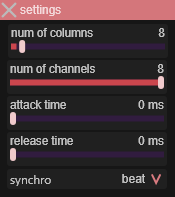
num of columns
Number of steps of the matrix, from 1 to 128.
num of channels
Number of lines of the matrix and of audio outputs, from 1 to 8.
attack time
Fade-in time of an output when its cell opens, from 0 to 1000 ms.
release time
Fade-out time of an output when its cell closes, from 0 to 10000 ms.
synchro
Rate of the steps:
- interval: the time set by interval.
- cycle, bar, beat: one step per cycle, bar or beat of the tempo.
- 8th, triplet, 16th, 24th, 32th, 48th, 64th, 128th: one step per note value of the tempo.
interval
Time between two steps, from 0 to 1000 ms. Shown when synchro is set to interval.
See also
version 7.0.250921
Edit All Pages