SAMPL Multi Player x8
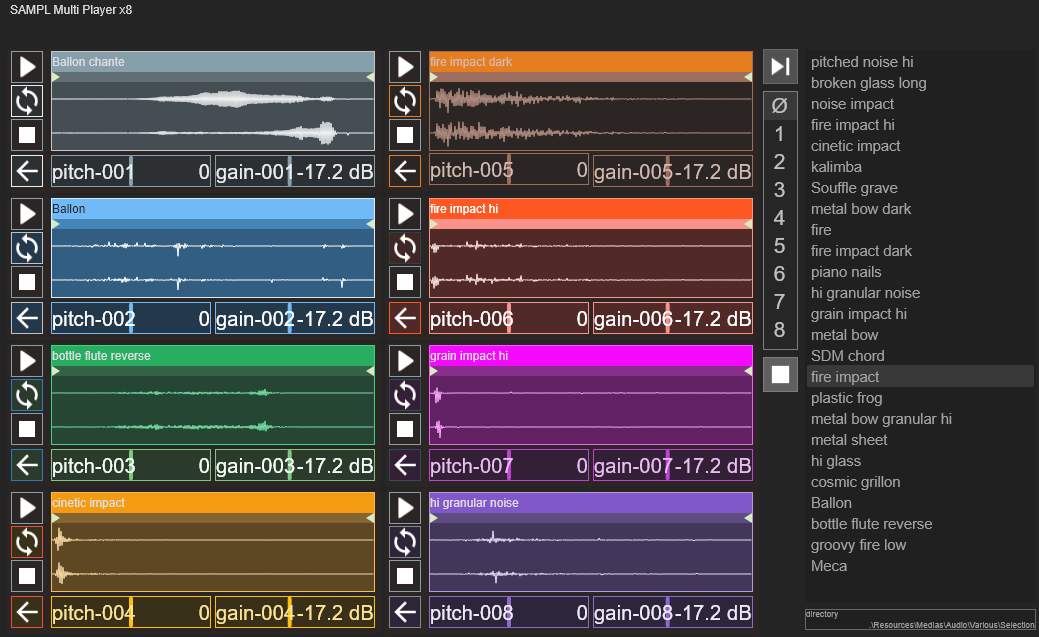
Eight sample players side by side, each one an audio-sampler with its own play, loop, stop, reverse, pitch and gain. The increment button plays them one after the other, from player 1 to player 8. No audio input. Audio out 1-2.
In the library: 1-Audio > Audio Sampling.
Settings
Players
The 8 players have the same controls. Each one shows the name and the waveform of its sample; drop an audio file on it to load it.
play
The play icon. Plays the sample once.
play loop
The loop icon. Plays the sample in a loop.
stop
The square icon. Stops the sample.
reverse
The arrow icon. Plays the sample backward.
pitch
Transposition of the sample, from -100 to 100 semitones (pitch-001 to pitch-008).
gain
Volume of the player, from -80 to 12 dB (gain-001 to gain-008).
Sequence
increment
The next icon at the top of the right column: plays the next player, from player 1 to player 8.
list
The box under increment: the player of the sequence, from Ø (none) to 8.
stop
The square icon under the list: stops all the players and sets the sequence back to Ø.
file list
The list at the right: the audio files of the directory folder.
directory
The folder whose audio files are listed in the file list (Resources\Medias\Audio\Various\Selection by default).
See also
version 7.0.250921
Edit All Pages