RECORD Audio
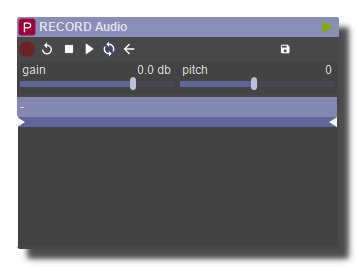
On the fly audio recorder: records the audio input with an audio-sampler-recorder and plays it back once or in a loop, with pitch, reverse, overdub and a recording that can start in time with the tempo.
Audio in 1-2, also heard through audio thru (settings window). Audio out 1-2.
Switch rec ON, play or speak, switch it OFF, then press play.
In the library: 1-Audio > Audio Sampling.
Settings
rec
 Starts and stops the recording of the input.
clear rec
 Clears the recorded sound.
stop
 Stops the playback.
play
 Plays the recorded sound once.
play loop
 Plays the recorded sound in a loop until you switch it OFF.
reverse
 Plays the recorded sound backward.
save name
 The icon at the right of the toolbar. Saves the recorded sound on the hard disk and asks for a file
name. The saved file is added to the file list of the sampler.
gain
Output volume, from -80 to 12 dB.
pitch
Transposition of the playback, from -48 to 48 st (semitones). The speed changes with the pitch.
sampler
The waveform of the recorded sound, under the faders.
Settings window
advanced settings
 Use this icon in the patch header to open these advanced settings. Like the other icons of the header, it shows when the mouse is over the control panel of the patch (the green dot, always shown, turns the patch ON or OFF).
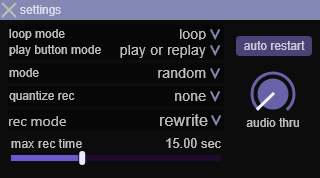
loop mode
When play loop is ON, how the loop follows the tempo:
- loop: free loop.
- cycle, bar, beat, 8th, 16th: the sound restarts at each cycle, bar, beat, 8th or 16th note.
- 2 bars to 16 bars: the sound restarts every 2 to 16 bars.
- loop on bar: the sound is played entirely, then restarts at the beginning of the next bar.
- loop on beat: the sound is played entirely, then restarts at the beginning of the next beat.
play button mode
- play or replay: the first click plays the sound once, a second click restarts it.
- play or stop: the first click plays the sound once, a second click stops it.
mode
How the files of the sampler list are read:
- single sample: only the selected file.
- next: at the end of the file, the next file of the list is selected.
- prev: at the end of the file, the previous file of the list is selected.
- random: at the end of the file, a random file of the list is selected.
quantize rec
Starts the recording in time with the tempo: none (at once), cycle, bar, beat, 8th, triplet, 16th, 24th, 32th, 48th, 64th or 128th.
rec mode
- rewrite: the new recording replaces the old one.
- append: the new recording is added after the old one.
- overdub: the new recording is mixed with the old one.
- circular buffer: the recording wraps around; the sound goes in at the head and is read from the tail.
max rec time
Maximum duration of the recording, from 0.01 to 1200 s. Keep it to the minimum you need.
auto restart
ON: the sound restarts from the beginning on play or when the patch is activated.
audio thru
Level of the input sent directly to the output, from -80 to 12 dB.
See also
version 7.0.250921
Edit All Pages