LOOPER RC51
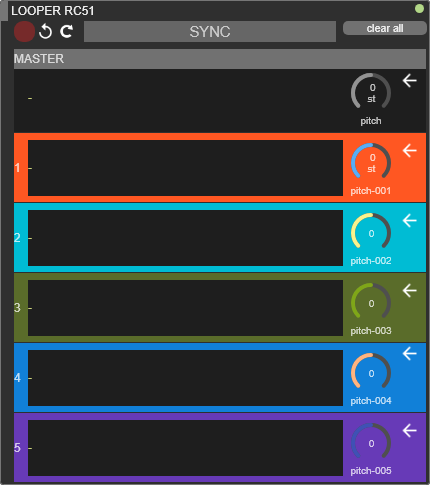
Loop station with 6 tracks: MASTER and the tracks 1 to 5. The first recording, on MASTER, sets the length of the loop. Each new recording goes to the next track; its length is rounded to a whole number of master loops. Each track is an audio-sampler-recorder with its own pitch and reverse.
Audio in 1-2. Audio out 1-2.
Switch rec ON, play, switch it OFF; do it again for a new track.
In the library: 1-Audio > Audio Looper.
Settings
Transport
rec
The red circle icon. Starts and stops the recording: the first one on MASTER, then on the next track.
undo
The left arrow icon. Mutes the last recorded track.
redo
The right arrow icon. Brings back the last muted track.
SYNC
ON: the length of the loop follows the tempo.
clear all
The button at the top right. Erases all the tracks.
Tracks
MASTER and the tracks 1 to 5 have the same controls. Each one shows the waveform of its recording.
reverse
The arrow icon at the right of the track: plays the track backward.
pitch
Transposition of the track, from -12 to 12 st (semitones).
Settings window
advanced settings
 Use this icon in the patch header to open these advanced settings. Like the other icons of the header, it shows when the mouse is over the control panel of the patch (the green dot, always shown, turns the patch ON or OFF).
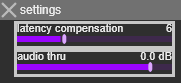
latency compensation
Compensation of the latency of the recordings, from 0 to 20.
audio thru
Level of the input sent to the output, from -80 to 12 dB.
See also
version 7.0.250921
Edit All Pages