LOOPER Echoplexx
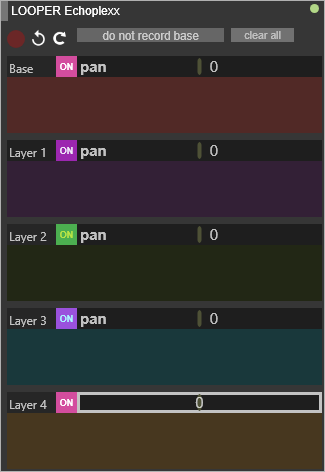
Layer looper inspired by the Echoplex: record a base loop, then up to 4 layers over it, all played in time with the base loop. The base records the first loop and sends its position to the 4 layers; each layer is an audio-sampler-recorder.
Audio in 1 (one channel). Audio out 1-2, each layer placed in the stereo field by its pan.
Switch Rec ON, play, switch it OFF; do it again to add a layer.
In the library: 1-Audio > Audio Looper.
Settings
Transport
Rec
The red circle icon. Starts and stops the recording of the next layer: the base loop first, then layers 1 to 4.
Undo
The left arrow icon. Removes the last recorded layer.
Redo
The right arrow icon. Brings back the last removed layer.
do not record base
ON: the first Rec goes to layer 1, not to the base.
clear all
Erases the base and all the layers.
Base and layers
The base and the 4 layers (Base, Layer 1 to Layer 4) have the same controls. Each one shows the waveform of its recording.
ON
Plays the base or the layer. OFF: it is muted.
pan
Position of the base or the layer in the stereo field, from -100 % (left) to 100 % (right).
Settings window
advanced settings
 Use this icon in the patch header to open these advanced settings. Like the other icons of the header, it shows when the mouse is over the control panel of the patch (the green dot, always shown, turns the patch ON or OFF).

Pitch /2
ON: plays the loops one octave down.
Feedback
Feedback of the loops, from 0 to 100 %.
save base sample
Saves the recording of the base loop.
Global Pitch
Transposition of all the loops, from -24 to 24 st (semitones).
See also
version 7.0.250921
Edit All Pages