LOOPER Peak Slicer
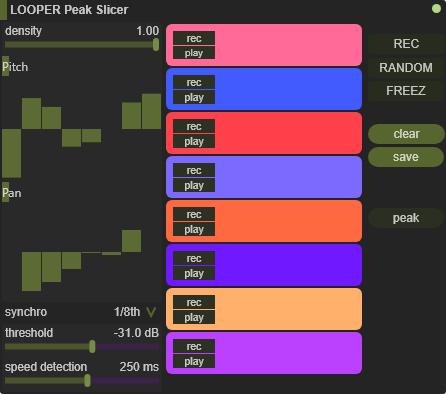
Live peak slicer: records the audio input in 8 slices cut at its peaks and replays them in time with the tempo, in order or at random, with a pitch, a pan and a density per slice.
Audio in 1-2, mixed to mono, goes to a peak detector. While REC is ON, each peak starts the recording of the next slice in an audio-sampler-recorder (one colored row per slice). At each synchro step the next slice plays, or a random one. Audio out 1-2.
Play a drum loop into the input, switch REC ON for a few seconds then OFF, and switch RANDOM ON.
In the library: 1-Audio > Audio Looper.
Settings
density
Chance for a slice to be heard, from 0 to 1 (1: all the slices are heard).
Pitch
Transposition of each slice, one bar per slice, from -12 to 12 st (semitones).
Pan
Position of each slice in the stereo field, one bar per slice, from -1 (left) to 1 (right).
synchro
Step at which the next slice plays: beat, 1/8th or 1/16th.
threshold
Level above which a peak is detected in the input, from -80 to 6 dB.
speed detection
Minimum time between two peaks, from 1 to 3000 ms.
slices
The 8 colored rows, one per slice, show the waveform of the slice. Their rec and play lights show when the slice is recording and when it is playing.
REC
The top switch of the right column (its caption shows only when ON). While ON, each peak starts the recording of the next slice.
RANDOM
The second switch of the right column (its caption shows only when ON). ON: a random slice plays at each synchro step instead of the next one.
FREEZ
The third switch of the right column (its caption shows only when ON). ON: the same slice is repeated.
save
Writes the slices to disk.
clear
Erases the slices.
peak
The bottom light of the right column: lights up at each peak detected in the input.
See also
version 7.0.250921
Edit All Pages