GROOVE Slicer
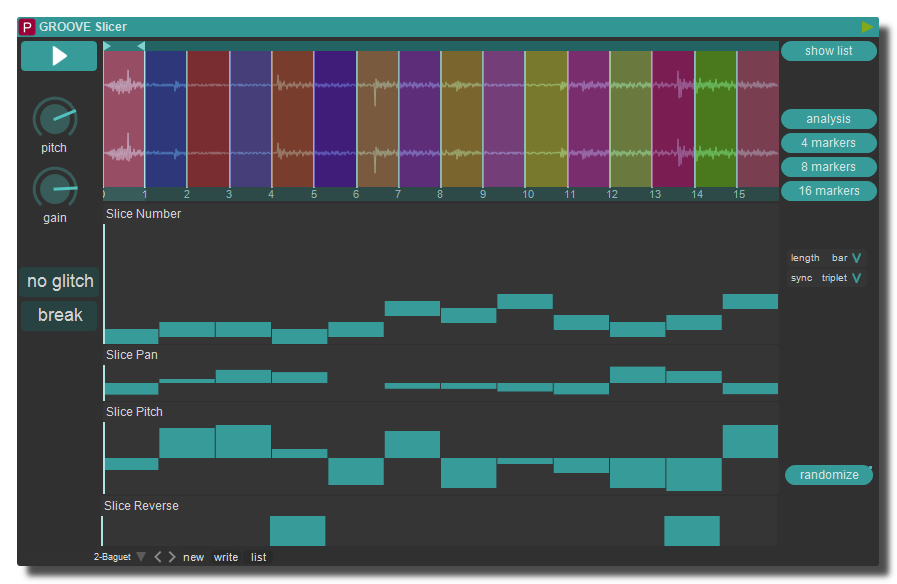
Beat slicer: cuts a drum loop into slices and replays them in a new order, in time with the tempo. The sampler of the control panel, an audio-sampler-recorder, holds the loop and its markers; a slice is the part between two markers. The markers are set by a beat analysis of the loop or placed evenly.
At each step, one of 8 sampler voices plays the slice chosen by Slice Number, with the pan, pitch and reverse of that step. The loop comes from the internal sampler or from the audio inputs 1-2 (recorded with Rec). The slices go to the audio outputs 1-2.
Click 8 markers, then randomize and listen.
In the library: 1-Audio > Audio Groove.
Settings
play
The play icon at the top left: while it is ON, the sequencers follow the steps of the tempo.
pitch
Global transposition, from -48 to 48 semitones.
gain
Output volume, from -80 to 12 dB.
glitches
When ON, the slices play without envelope.
break
When ON, the steps play in random order.
sampler
The waveform of the loop, with its slices. You can move the markers by hand.
Rec
Records the audio inputs 1-2 into the sampler. Shown when audio in vs sampler is set to Audio Input, with Clear and max rec time.
Clear
Clears the recording.
max rec time
Maximum length of the recording, from 0.01 to 1200 seconds.
Slice Number
Step sequencer: the slice played at each step, from 0 to 7.
Slice Pan
Step sequencer: the pan of each step, from -1 (left) to 1 (right).
Slice Pitch
Step sequencer: the transposition of each step, from -12 to 12 semitones by default. Its range is set by pitch ambitus in the Detect Settings window.
Slice Reverse
Switch sequencer: the steps whose switch is ON play their slice backwards.
show list
Opens the list of loops of the sampler.
analysis
Analyzes the loop and adds a marker on each beat found. Set the detection with thresh and speed in the Detect Settings window.
4 markers
Replaces the markers by 4 markers that cut the loop evenly. You can then move them by hand. 8 markers and 16 markers do the same with 8 and 16 markers.
length
Length of the sequence. In free mode you choose the number of steps.
sync
Step rate of the sequence, as a note value of the tempo.
randomize
Gives new random steps to Slice Number, Slice Pan and Slice Pitch.
Settings window
advanced settings
 Use this icon in the patch header to open these advanced settings. Like the other icons of the header, it shows when the mouse is over the control panel of the patch (the green dot, always shown, turns the patch ON or OFF).
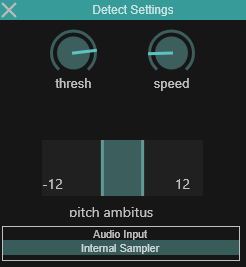
The window is titled Detect Settings.
thresh
Level above which the analysis detects a beat, from -80 to 6 dB.
speed
Minimum time between two markers of the analysis, from 1 to 800 ms.
pitch ambitus
Range of the Slice Pitch sequencer, from -48 to 48 semitones (here -12 to 12).
audio in vs sampler
Source of the loop:
- Audio Input: the audio inputs 1-2, recorded with Rec.
- Internal Sampler: the loops of the sampler.
See also
version 7.0.250921
Edit All Pages