GROOVE Physics
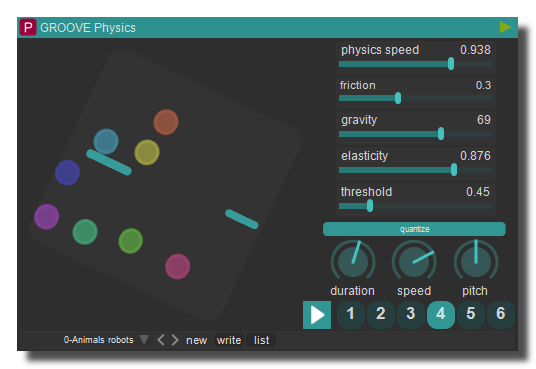
Rhythms made by balls that bounce in a rotating box, a kind of washing machine for grooves. The box is a panel-container that uses the physics engine; its 8 balls are the 8 voices of the patch. When the speed of a ball changes more than threshold (a hit), its audio-sampler plays one sample of the kit, on the next 16th note of the tempo when quantize is ON.
While Play is ON, the box and the gravity turn together. The patch has no input; the samples go to the audio outputs 1-2.
Switch Play ON and raise elasticity for more bounces.
In the library: 1-Audio > Audio Groove.
Settings
box
The rotating box with its two inner bars and the 8 colored balls. Each ball plays a sample when a hit changes its speed by more than threshold.
physics speed
Speed of the physics simulation, from 0 to 3.
friction
Friction of the balls, from 0 to 10.
gravity
Strength of the gravity, from 2 to 100.
elasticity
How much the balls bounce, from 0 to 1: the higher, the more bounces.
threshold
Change of speed of a ball that counts as a hit and plays a sample, from 0 to 2: the higher, the fewer hits.
quantize
When ON, each hit plays on the next 16th note of the tempo. When OFF, it plays at once.
duration
Length of the samples played, from 0 to 1, relative to the original length.
speed
Speed of the rotation of the box, from 0 to 1.
pitch
Transposition of the samples, from -24 to 24 semitones.
Play
The play icon: while ON, the box and the gravity turn.
kit switches
The six switches 1 to 6 at the bottom right: choose the kit (sample list) played by the balls.
Settings window
advanced settings
 Use this icon in the patch header to open these advanced settings. Like the other icons of the header, it shows when the mouse is over the control panel of the patch (the green dot, always shown, turns the patch ON or OFF).
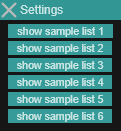
show sample list
Six buttons, show sample list 1 to show sample list 6: each shows the sample list of the kit with the same number.
See also
version 7.0.250921
Edit All Pages