GROOVE Matrix
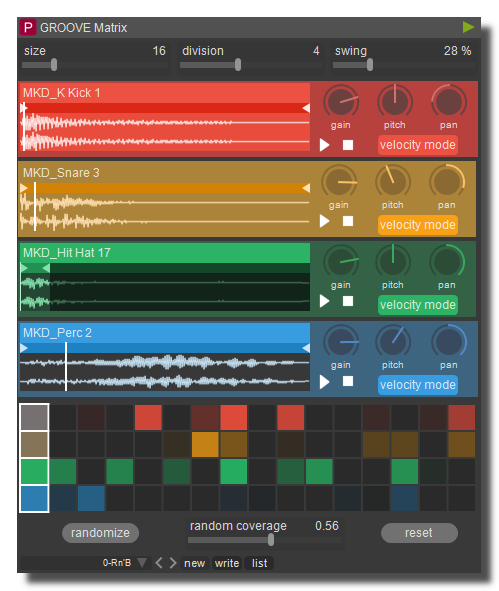
Drum machine with 4 sample tracks played by a step matrix. Each line of the panel-matrix is a track (kick, snare, hi-hat, perc) and each column a step; the cursor follows the tempo of the master synchro. Each track has its own audio-sampler.
The value of a cell sets the volume of the hit, from -15 to 0 dB. The patch has no input; the 4 tracks are mixed to the audio outputs 1-2.
Switch on the master synchro, then click and drag in the cells.
In the library: 1-Audio > Audio Groove.
Settings
size
Number of steps of the sequence, from 1 to 64.
division
Number of steps per beat, from 1 to 8:
- 1 for beat
- 2 for 8th
- 3 for triplet
- 4 for 16th
swing
Swing amount, from 0 to 100 %.
Tracks
The 4 tracks have the same controls.
sampler
The waveform of the track, with the name of its sample (here MKD_Kick 9, MKD_Snare 3, MKD_Hit Hat 14 and MKD_Perc 4). Double-click the header of the waveform to load another file and change the sound of the track.
gain
Volume of the track, from -80 to 12 dB.
pitch
Transposition of the sample, from -24 to 24 semitones.
pan
Position of the track in the stereo image, from -1 (left) to 1 (right).
play

Plays the sample of the track.
M

Mutes the track.
velocity mode
The colored switch of the track; OFF it reads proba mode.
- velocity mode: the value of a cell sets the volume of the hit.
- proba mode: the value of a cell sets the probability that the step plays.
Matrix
matrix
One line per track, one column per step. Click and drag in a cell to set its value; an empty cell plays nothing. The color intensity of a cell shows its value.
shuffle
The crossed arrows icon at the bottom left: fills the matrix at random.
random coverage
How many cells shuffle fills, from 0 to 1.
reset
The circular arrow icon: clears the matrix.
See also
version 7.0.250921
Edit All Pages