GRAIN Micro Loop
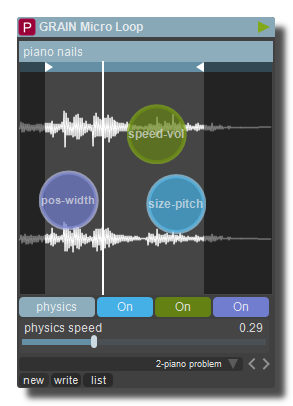
Granular micro loops: plays a small zone of an audio file as grains, with a reading head that wanders inside the zone. An audio-sampler-grain module reads the file between the start and the end of the zone; a data-generator-random picks new positions in the zone and a script moves the head to each one, forward or backward, faster when the target is far.
Three balls over the waveform set the zone, the grain size, the pitch, the speed and the volume. Drag them by hand, or let the physics engine move them. No audio input. Audio out 1-2.
Drag the balls by hand, then switch physics ON.
In the library: 1-Audio > Audio Granular.
Settings
sampler
The waveform display of the audio file, with its name above it (Bouteille 1 in the capture). The shaded part of the waveform is the zone played by the grains.
pos-width
The purple ball. X: start of the zone in the file. Y: width of the zone (top: narrow).
size-pitch
The blue ball. X: grain size, from 1 to 200 ms. Y: pitch, from +24 to -24 st (semitones).
speed-vol
The green ball. X: how fast the reading head moves to its target (left: slow). Y: output volume.
physics
ON: the physics engine moves the balls whose On switch is ON.
On
Three switches, one per ball, in the color of the ball: ON lets the physics engine move that ball. Shown when physics is ON.
physics speed
Speed of the balls moved by the physics engine, from 0.2 to 10. Shown when physics is ON.
See also
version 7.0.250921
Edit All Pages