GRAIN Mangler
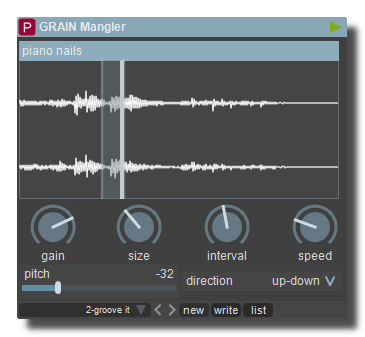
Granular file player: plays a cloud of grains taken from an audio file (piano nails by default). An audio-sampler-grain-cloud module makes the grains, and a data-generator-ramp moves their reading position again and again through the part of the file chosen with the range fader. A reverb follows.
No audio input: add your own files to the list of the sampler. Audio out 1-2.
Choose a short range with the range fader and lower speed. Set pitch to 0 and interval below size for a smooth sound.
In the library: 1-Audio > Audio Granular.
Settings
sampler
The waveform display of the audio file, with its name above it (piano nails). Add your own files to its list to play them.
range
The shaded zone over the waveform: the part of the file read by the grains. Drag it to move it, drag its edges to change its size.
gain
Output volume, from -80 to 12 dB.
size
Length of the grains, from 0.01 to 2000 ms.
interval
Time between two grains, from 0.01 to 2000 ms.
speed
Time of one pass of the reading position through the range, from 1 to 100000 ms: the higher, the slower.
pitch
Transposition of the grains, from -64 to 64 st (semitones).
direction
Direction of the reading position through the range:
- up: from left to right.
- down: from right to left.
- up-down: alternately up and down.
Magic pad
The round pad with the orbit point is the magic pad: it moves many settings of the patch at once, around your own settings.
- centre: every setting is at the value you gave it. Bring the point back to the centre to find your sound again.
- distance from the centre: how far the settings go from your values, from nothing at the centre to the most on the circle and beyond, in the corners. It grows with the square of the distance, so the pad is finer near the centre.
- angle: turning around the centre, from the top and clockwise, moves the settings along their orbit. Each setting follows its own smooth curve, so the combinations keep changing, and the same point always gives the same sound.
A setting changed by hand, by a preset or by an automation keeps its new value as the centre of its orbit. These values are saved with the patch.
The pad is a panel-xy-pad module read by a script module named HUE ORBIT: the table at the end of its script lists the settings it moves, their curves and how far each one moves.
Settings moved by the pad: size, interval, speed, pitch, the range (its centre and its width) and the room size of the reverb in the settings window.
Not moved: gain, direction, and the wet level, dry level and freeze of the reverb.
Settings window
advanced settings
 Use this icon in the patch header to open these advanced settings. Like the other icons of the header, it shows when the mouse is over the control panel of the patch (the green dot, always shown, turns the patch ON or OFF).
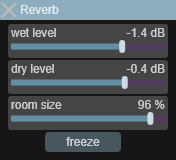
The Reverb window.
wet level
Level of the reverb, from -80 to 12 dB.
dry level
Level of the sound without reverb, from -80 to 12 dB.
room size
Size of the room of the reverb, from 0.1 to 100 %.
freeze
ON: holds the reverb tail.
See also
version 7.0.250921
Edit All Pages