DELAY multi Tap
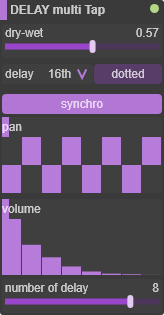
Multi-tap delay: up to 16 echoes (taps) at 1, 2, 3... times the delay time, each with its own volume and pan, drawn in the control panel. The delay time follows the tempo of Usine or takes a free time in milliseconds.
The audio inputs 1 and 2 each go into an audio-delay-cloud, and an audio-mix-crossfade mixes the dry sound and the echoes to the audio outputs 1-2.
Play short hits, draw a falling volume and alternate the pan bars.
In the library: 1-Audio > Audio FX > Delay.
Settings
dry-wet
Balance between the dry sound and the echoes, from 0 (dry sound only) to 1 (echoes only).
delay
Time between two taps.
When synchro is ON, a list sets the time as a note value of the tempo:
- beat
- 8th
- triplet
- 16th
- 24th
- 32th
- 48th
- 64th
- 128th
When synchro is OFF, a fader sets the time in milliseconds. Its maximum is 16000 ms divided by number of delay (2000 ms with 8 taps).
dotted
The box next to delay: multiplies the delay time by 1.5 (dotted note). Shown when synchro is ON.
synchro
ON: the delay time follows the tempo (delay list, dotted). OFF: the time is set in milliseconds with the delay fader.
pan
Pan of each tap, one bar per tap, from -1 (bottom, left) to 1 (top, right). Draw the bars with the mouse.
volume
Level of each tap, one bar per tap, from 0 to 1. Draw the bars with the mouse.
number of delay
Number of taps, from 1 to 16.
See also
version 7.0.250921
Edit All Pages