DELAY Analog
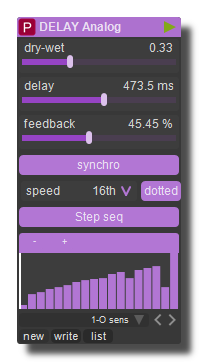
Stereo echo that imitates an analog delay: when delay changes, the delay time glides slowly to the new value and the echoes bend in pitch, like a tape delay. The delay time can follow the tempo of Usine, and a step sequencer can change it on each clock tick.
The audio inputs 1-2 go into an audio-delay, and an audio-mix-crossfade mixes the dry sound and the echoes to the audio outputs 1-2. The glide of the delay time comes from a data-filter-smooth-attack-release module.
Play a sound and move delay quickly to hear the pitch bend. Then turn synchro ON, turn Step seq ON and draw the steps.
In the library: 1-Audio > Audio FX > Delay.
Settings
dry-wet
Balance between the dry sound and the echoes, from 0 (dry sound only) to 1 (echoes only).
delay
Delay time, from 0 to 5000 ms. When it changes, the time glides to the new value and the echoes bend in pitch. When synchro is ON, the delay time follows the tempo, one speed long.
feedback
Amount of the echoes sent back into the delay, from 0 to 100 %: the higher, the more repeats.
synchro
ON: the delay time follows the tempo of Usine (speed, dotted). OFF: the time is set by delay.
speed
Delay time as a note value of the tempo, shown when synchro is ON:
- cycle
- bar
- 2 beats
- beat
- 8th
- triplet
- 16th
- 24th
- 32th
- 48th
- 64th
- 128th
dotted
Multiplies the delay time by 1.5 (dotted note). Shown when synchro is ON.
Step seq
Turns the step sequencer ON or OFF. When ON, the sequencer sets a new delay on each clock tick. Shown when synchro is ON.
step sequencer
The steps of the sequencer, shown when Step seq is ON. Each step holds a delay time, from 0 to 4000 ms. Draw the steps with the mouse.
+ and -
Add or remove a step of the sequencer. Shown when Step seq is ON.
See also
version 7.0.250921
Edit All Pages