DELAY Multi Band x3
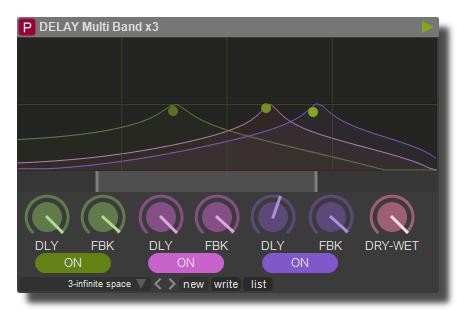
Multi-band stereo delay: the sound is split into 3 bands (low, mid, high) and each band gets its own echo synchronized on the tempo, with its own feedback and an optional random pan.
The audio inputs 1-2 go through 3 audio-filter-simple modules, one per band. A polyphonic sub-patch, delay line, plays one voice per band, built on the audio-delay module. An audio-dynamics-limiter follows before the audio outputs 1-2.
The bar at the bottom of the panel selects and stores the presets of the patch.
Play drums, give each band its own DLY and move the range fader.
In the library: 1-Audio > Audio FX > Delay.
Settings
filter curves
The display at the top shows the response of the 3 band filters: low, mid and high.
range
The range fader under the curves sets the low band (left handle) and the high band (right handle). The mid band sits between them.
DLY
Delay time of the band as a note value of the tempo, from beat to 64th. There is one DLY knob per band.
FBK
Repeats and level of the echoes of the band, from 0 to 99 %. At 0 the band has no echo. There is one FBK knob per band.
ON
Turns the band ON or OFF. There is one ON switch per band.
DRY-WET
Balance between the dry sound and the echoes, from 0 (dry sound only) to 1 (echoes only).
Magic pad
The round pad with the orbit point is the magic pad: it moves many settings of the patch at once, around your own settings.
- centre: every setting is at the value you gave it. Bring the point back to the centre to find your sound again.
- distance from the centre: how far the settings go from your values, from nothing at the centre to the most on the circle and beyond, in the corners. It grows with the square of the distance, so the pad is finer near the centre.
- angle: turning around the centre, from the top and clockwise, moves the settings along their orbit. Each setting follows its own smooth curve, so the combinations keep changing, and the same point always gives the same sound.
A setting changed by hand, by a preset or by an automation keeps its new value as the centre of its orbit. These values are saved with the patch.
The pad is a panel-xy-pad module read by a script module named HUE ORBIT: the table at the end of its script lists the settings it moves, their curves and how far each one moves.
Settings moved by the pad: the range of the bands (its centre and its width), the DLY and FBK of each band, and max frequency, Q and damping in the settings window. DLY moves by steps, from one note value to another.
Not moved: DRY-WET, the ON switches, spread, random pan and filter type.
Settings window
advanced settings
 Use this icon in the patch header to open these advanced settings. Like the other icons of the header, it shows when the mouse is over the control panel of the patch (the green dot, always shown, turns the patch ON or OFF).
spread
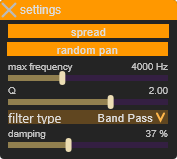
Spread effect to enlarge the stereo image.
random pan
When ON, the echoes of each band are placed at a random position in the stereo image.
max frequency
Highest frequency of the bands, from 1000 to 10000 Hz.
Q
Resonance of the band filters, from 0.3 to 10. Small values for a large band, high values for a narrow band.
filter type
Shape of the band filters:
- Low/Hi Pass
- Band Pass
damping
Damping of the echoes, from 0 to 99 %.
See also
version 7.0.250921
Edit All Pages