Video Geometric Fish Eye
Applies a fish-eye lens effect or inverse (removes the fish-eye effect) to the video flow.
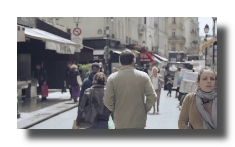
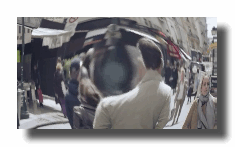
Inside the lens, a circle around the lens center, each pixel shows a point of the image nearer to the center or further away depending on the lens factors, in the same direction from the center when the two factors are equal (otherwise each axis is scaled by its own factor). The effect stops at 0.9 times the lens radius: the outer tenth of the lens and the image outside the lens are unchanged. A point that falls outside the image is mirrored back into it at the edges it crosses. The output keeps the size of the input.
What to expect
- At the center the image is magnified about 3 times with a factor of 0.5 and 10 times with a factor of 1; negative factors shrink it as much.
- The effect fades out towards the edge of the lens and the picture joins the unchanged image without a jump; it only bends at 0.9 times the lens radius.
- With factors of 0 or more, each pixel of the lens shows a point between itself and the lens center, so the lens never shows points from outside the image, whatever the shape of the frame, except for a few pixels next to a lens center placed on the very edge of the image (lens center x or y at 1, or within half a pixel of the edge), which show the mirrored image.
- With negative factors, wherever the lens reaches beyond the image by more than its outer tenth (a lens larger than the image, or a lens near one of its edges), the shrunk picture leaves a border along those edges that shows the image mirrored at the frame edges; when only one factor is negative, only along the edges of its axis (the left and right edges for lens factor x, the top and bottom edges for lens factor y).
Settings
bypass
Bypasses the module processing when activated (ON).
- OFF (0): Module processes normally
- ON (1): Input passes directly to output without processing
video in
Video input flow(s).
video out
Video output flow(s).
process time
Total time used for the calculation of the module.
lens center x
Horizontal position of the center of the lens, from 0 (left edge) to 1 (right edge); 0.5 by default.
lens center y
Vertical position of the center of the lens, from 0 to 1 across the height of the image; 0.5 by default.
lens radius
Radius of the lens, as a fraction of the smaller side of the image (the height of a landscape image), from 0 to 1 (one pixel at least); 0.5 by default.
lens factor x
Amount of lens effect on the x axis, from -1 to 1; 0.5 by default. Use positive values to accentuate the fish-eye effect (the center of the lens is magnified), negative to remove it (the center is shrunk); 0 leaves the x axis unchanged.
lens factor y
Amount of lens effect on the y axis, from -1 to 1; 0.5 by default. Use positive values to accentuate the fish-eye effect (the center of the lens is magnified), negative to remove it (the center is shrunk); 0 leaves the y axis unchanged.
Common Settings
info
show manual
Button. Opens the manual page of the selected object (or of its parent module for a control) in the web browser. If no page exists for this object, an error is traced in the trace panel.
For more details about information/help creation, see create-help-file.
description
Free multi-line text attached to the module, saved with the patch. When it is not empty, it is shown as the hint of the module (mouse over the module header in the patch) in place of the default module hint, even when the module hints are disabled.
ID's
visible only in god mode, see setup-panel-tab-expert.
unique ID
Read-only, not saved. Current private numeric ID of the object, used internally to identify it (for example as the target of a bind ID).
preset ID
Read-only, not saved. Private ID used to store and recall the values of this control in presets.
recreate ID
Button. Generates a new unique ID, original ID and preset ID for the object. Use it if you experience difficulties in Polyphonic mode or if two objects share the same ID. Preset values and binds referring to the old IDs are lost.
Object Remote Address
absolute
Read-only, not saved. Absolute address of the object in the Usine objects tree, built from the workspace root. This is the address to use to reach the object from scripts, the objects panel or remote messages. Only shown for objects that are registered in the objects list. See objects-address.
local
Read-only, not saved. Address of the object relative to the current patch, valid inside that patch only. See objects-address.
user addr
Free user-defined address for the object (empty by default). When set, the object is also registered in the objects tree under this name, so it can be reached independently of its position in the workspace (the value is also reported in the mouse-over and mouse-down chunks). Changing it rebuilds the objects list. Only available on objects that support a user address. See objects-address.
See also
- Video Geometric Kaleidoscope
- Video Geometric Downsample
- Video Geometric Mirror Left
- Video Geometric Resize
- Video Geometric Bands
- Video Geometric Swirl
- Video Geometric Shuffle
- Video Geometric Flip Horizontal
- Video Displacement Map
- Video Geometric Mirror Top
- Video Geometric Polar
- Video Geometric Get Size
- Video Geometric Upsample
- Video Geometric Change Aspect Ratio
- Video Geometric Fish Eye
- Video Geometric Luma Displace
- Video Geometric Bulge
- Video Geometric Ripple
- Video Geometric Flip Vertical
- Video Geometric Tile
version 7.0.250921
Edit All Pages