PAD padKontrol
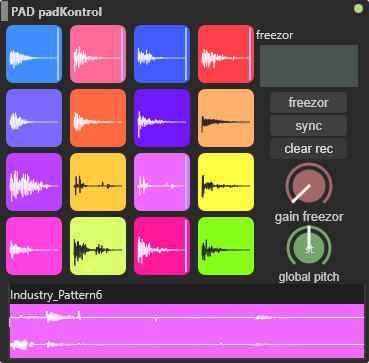
Sixteen sample pads for the Korg padKontrol MIDI controller, or any MIDI pads. A script sends the note of each pad (set in the midi settings window) to one voice of the pads: an audio-sampler per pad, whose gain follows the velocity (-30 to 0 dB). The pitch bend of the X-Y pad and global pitch transpose all the pads.
The freezor records what you play and loops it in time with the tempo.
MIDI in: notes and pitch bend. Audio out 1-2.
Without the padKontrol, click the pads with the mouse.
In the library: 1-Audio > Audio Pads.
Settings
Pads
pads
The 16 pads, each one with the waveform of its sample. Click a pad to play it and show its sampler below the pads.
global pitch
Transposition of all the pads, from -48 to 48 st (semitones). The pitch bend of the X-Y pad adds up to 26 semitones up or down.
Freezor
freezor display
The display under the freezor title: shows the recording of the freezor.
freezor
ON: hold a pad to record the pads, release it to loop the recording in time with the tempo.
sync
ON: the length of the freezor loop follows the tempo.
clear rec
Erases the recording of the freezor.
gain freezor
Level of the freezor loop, from -80 to 0 dB.
Selected pad
The sampler of the selected pad, under the pads, with the name of its sample and its waveform. Drop another audio file on it to add it to its list.
pitch
Transposition of the pad, from -24 to 24 semitones.
rev
Plays the sample backward.
gain
Volume of the pad, from -80 to 12 dB.
Settings window
advanced settings
 Use this icon in the patch header to open these advanced settings. Like the other icons of the header, it shows when the mouse is over the control panel of the patch (the green dot, always shown, turns the patch ON or OFF).
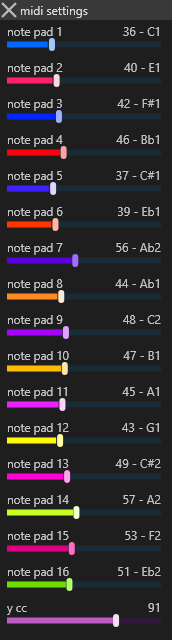
The midi settings window.
note pad
Sixteen faders, one per pad (from the top left pad to the bottom right one): the MIDI note that plays the pad, from 0 to 127. By default, the notes of the padKontrol (36 - C1 for the first pad).
y cc
Number of the MIDI control change of the Y axis of the X-Y pad, from 0 to 127 (91 by default). The current patch does not use it.
See also
version 7.0.250921
Edit All Pages