PAD Drums Pad
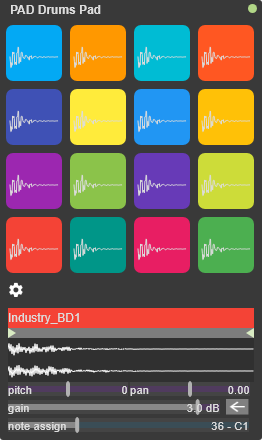
Sixteen drum pads for a pad controller: each pad plays one sample, with its own pitch, pan, gain and reverse. Sixteen voices, each one an audio-sampler, play on the MIDI notes 36 (C1) for the first pad up to 51 (D#2) for the last one; note assign changes them.
MIDI in: notes of a pad controller or a keyboard. Audio out 1-2. Drop an audio file on a pad to add it to the list of its sampler.
Play the notes C1 to D#2 on a MIDI keyboard.
In the library: 1-Audio > Audio Pads.
Settings
pads
The 16 pads, each one with the waveform of its sample. Click a pad to select it: its settings show under the pads.
show
The gear icon under the pads: shows or hides the settings of the selected pad.
Selected pad
The name of the sample and its waveform, then the settings of the selected pad.
pitch
Transposition of the sample, from -24 to 24 semitones.
pan
Position in the stereo field, from -1 (left) to 1 (right).
gain
Volume of the pad, from -80 to 12 dB.
rev
The arrow icon at the right of gain: plays the sample backward.
note assign
MIDI note that plays the pad, from 0 to 127 (36 - C1 for the first pad).
Settings window
advanced settings
 Use this icon in the patch header to open these advanced settings. Like the other icons of the header, it shows when the mouse is over the control panel of the patch (the green dot, always shown, turns the patch ON or OFF).

play on click
ON: a pad plays when you click it.
See also
version 7.0.250921
Edit All Pages