MIDI PianoRoll
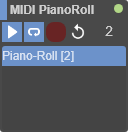
Records, edits and plays MIDI notes with the midi-piano-roll module. The MIDI input goes into the piano roll, and the piano roll plays to the MIDI output.
The module holds several MIDI files: num file, in the settings window, selects the one played. The control panel holds the transport (play, play loop, rec, clear) and the number of the current file.
Switch rec ON, play notes into the MIDI input of the rack, switch rec OFF and listen. Then double-click the piano roll to open its editor and draw notes.
In the library: 2-Midi.
Settings
play
The triangle icon: plays the current MIDI file. Works only when play loop is OFF.
play loop
The loop icon: plays the MIDI file in a loop.
rec
The red dot: starts or stops the recording of the MIDI input.
clear
The round arrow: clears the MIDI events of the current file.
file
Number of the current MIDI file.
Piano-Roll
The box Piano-Roll [2] is the piano roll module: double-click it to open its editor, where you see, draw and edit the notes.
Settings window
advanced settings
 Use this icon in the patch header to open these advanced settings. Like the other icons of the header, it shows when the mouse is over the control panel of the patch (the green dot, always shown, turns the patch ON or OFF).
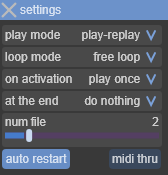
play mode
Behavior of play:
- play-replay: the first click plays the MIDI file once, a second click restarts it.
- play-stop: the first click plays the MIDI file once, a second click stops it.
loop mode
Synchronization of the loop:
- free loop: the sequence is played in a loop.
- cycle: the sequence is played at the beginning of each cycle.
- bar: the sequence is played at the beginning of each bar.
- loop on bar: the sequence is played entirely, then restarts at the beginning of the next bar.
- loop on beat: the sequence is played entirely, then restarts at the beginning of the next beat.
- step by step: the sequence is played step by step, on the next step command of the piano roll module.
on activation
What happens when the patch is activated:
- do nothing: nothing is done.
- play once: the MIDI file is played once.
at the end
What happens when the MIDI sequence reaches its end:
- do nothing: nothing is done.
- next grid section: the grid goes to the next section.
num file
Number of the MIDI file played, from 1 to 8.
auto restart
When ON, the MIDI file restarts when the master synchro of Usine restarts.
midi thru
When ON, the incoming MIDI notes pass to the output: you hear what you record.
See also
version 7.0.250921
Edit All Pages