MIDI Keyboard
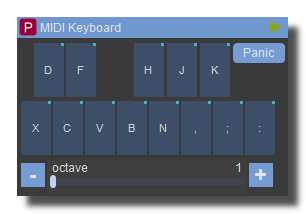
One-octave MIDI keyboard (13 keys, C to C) played with the mouse or with the keys of the computer keyboard. A key sends a note ON when it is pressed and a note OFF when it is released.
A polyphonic sub-patch has one voice per key, built on the midi-generator-create module. The notes go to the MIDI out of the patch and to the global MIDI bus BIG KEYBOARD, which any patch can read with a bus get midi module.
Route the MIDI out of the rack to a synth and type X D C F V.
In the library: 2-Midi.
Settings
keys
13 keys from C to C. Click a key, or press the key of the computer keyboard written on it (X D C F V B...). Choose the AZERTY or QWERTY layout in the settings window.
Panic
Releases all the keys and sends ALL NOTES OFF.
-
Moves the keyboard one octave down.
octave
Octave of the keyboard, from 1 to 8.
+
Moves the keyboard one octave up.
Settings window
advanced settings
 Use this icon in the patch header to open these advanced settings. Like the other icons of the header, it shows when the mouse is over the control panel of the patch (the green dot, always shown, turns the patch ON or OFF).
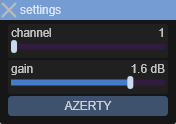
channel
MIDI channel of the notes, from 1 to 16.
gain
Velocity of the notes in dB, from -80 to 12 dB.
AZERTY
Layout of the computer keyboard: AZERTY when OFF, QWERTY when ON.
See also
version 7.0.250921
Edit All Pages