FILTER Simple
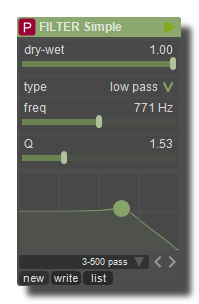
Classic stereo resonant filter: low pass, high pass, band pass or notch. Set the frequency and the resonance with the faders or by dragging the dot of the curve.
The audio inputs 1-2 go into an audio-filter-simple, then into an audio-dynamics-limiter that tames the loud resonances, and an audio-mix-crossfade mixes the dry sound and the filtered sound to the audio outputs 1-2.
Play a drum loop in low pass and drag the dot left and up.
In the library: 1-Audio > Audio FX > Filter.
Settings
dry-wet
Balance between the dry sound and the filtered sound, from 0 (dry sound only) to 1 (filtered sound only).
type
Filter type:
- low pass
- high pass
- band pass
- notch
freq
Cutoff frequency of the filter, from 50 to 10000 Hz. It follows the dot of the curve and moves it.
Q
Resonance of the filter, from 0.01 to 200. It follows the dot of the curve and moves it.
filter curve
The curve of the filter. Drag its dot: left-right sets the frequency, up-down sets the Q (resonance).
Settings window
advanced settings
 Use this icon in the patch header to open these advanced settings. Like the other icons of the header, it shows when the mouse is over the control panel of the patch (the green dot, always shown, turns the patch ON or OFF).
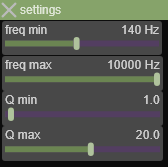
The four faders set the range of the dot of the curve.
freq min
Lowest frequency reached by the dot, from 50 to 2000 Hz.
freq max
Highest frequency reached by the dot, from 100 to 10000 Hz.
Q min
Lowest Q reached by the dot, from 1 to 200.
Q max
Highest Q reached by the dot, from 1 to 200.
See also
version 7.0.250921
Edit All Pages