Combine
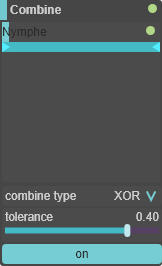
Combines two videos pixel by pixel: the incoming video (video 1) and the video of the player in the control panel (Nymphe.mp4, video 2). The combination is an operation on the pixels (ADD, AND, SUB, OR, XOR) or the replacement of a color of video 1 by video 2.
The video comes from the previous patch of the rack (or the rack input), goes into the video-mix-combine module with the video of a video-player module, and the result goes to the next patch of the rack (or the rack output).
In a rack, put it after the Video Player patch (3-Video), drop a video out device in the rack output, then change combine type.
In the library: 3-Video > Video Mix.
Settings
video player
Panel of the video player that gives the second video: it shows the name of the file played (Nymphe).
combine type
How the pixels of the two videos are combined:
- ADD: adds the pixels of video 1 and video 2.
- AND: logical AND of the pixels.
- SUB: subtracts the pixels of video 2 from those of video 1.
- OR: logical OR of the pixels.
- XOR: logical XOR (exclusive OR) of the pixels.
- replace black, replace white, replace red, replace green, replace blue: the pixels of video 1 in that color take the pixels of video 2.
tolerance
Tolerance of the color detection, from 0 to 0.5. Used by the replace modes only.
on
Turns the effect ON or OFF. OFF bypasses the effect: the video passes unchanged.
See also
version 7.0.250921
Edit All Pages