Procedure Call
Execute (call) a procedure defined by a procedure module. See procedures.
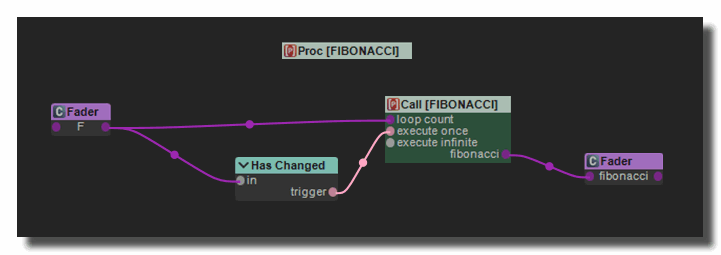
Settings
procedure name
Name of the procedure to define or to call.
name suffix
Defines if a suffix is added automatically at the end of the name to produce names like PROCEDURE-1, PROCEDURE-2,etc.
- no suffix
- poly voice num: number of the voice in a polyphonic sub-patch.
- rack num: number of the current rack.
- patch num: number of the current patch.
- user suffix: custom suffix defined by the user in the user suffix parameter (see below).
user suffix
Custom suffix to append to the procedure name et when name suffix is set to user suffix.
processing mode
Execution mode of the procedure.
- immediate: the procedure is called immediately after a trigger is received on the execute once input. The procedure is executed in the thread of the patch.
- thread: the procedure creates a separate thread with a low priority and is executed shortly after a trigger is received on the execute once but not immediately. Recommended for heavy calculation.
- exclusive: the procedure creates a separate thread with a low priority and is executed after a trigger is received on the execute once only if the main process thread of Usine is unoccupied.
loop count
Number of times the procedure is executed. For example, to fill an array it will be the size of the array.
execute once
Executes the procedure when a trigger is received.
mode
- manual (trigger button): executed when a execute-one trigger is received,
- always (infinite loop): The procedure is executed indefinitely (endless loop),
- automatic (on params changed): is executed automatically when any input parameter or loop-count has changed.
processing
Send a 1 value when the module is processing the operation (load, save, get etc).
A flow-from-1-to-0 must be used to trigger something when the operation is completed or canceled.
Useful only if processing mode=thread.
finished
Sends a 1 value when the procedure has finished its execution.
Useful only if processing mode=thread.
process time
Amount of time the procedure takes to execute in milliseconds.
refresh
Can be used to refresh the list of in/out parameters if the procedure definition has changed.
Common errors
Error: "Procedure not found" The procedure name set in the Procedure Call does not match any existing Procedure module. This happens when the name is misspelled, the Procedure module has been deleted, or the Procedure module has not been created yet. Check that both names match exactly (names are case-insensitive).
Warning: "Some parameters of the procedure have the same name" Two or more input or output parameters (faders) inside the Procedure's patch share the same name. This causes ambiguity when the Procedure Call maps values to/from those parameters. Rename the duplicate parameters inside the Procedure's patch so each has a unique name.
No effect when triggering execute once in "always" mode When mode is set to always (infinite loop), the procedure runs continuously on every processing cycle. The execute once button and trigger have no additional effect in this mode — the procedure is already executing. Switch to manual mode if you want on-demand execution only.
Procedure still running (thread/exclusive mode) In thread or exclusive processing mode, if a new execute once trigger arrives while the procedure is still running from a previous call, the new trigger is silently ignored (in manual mode) or re-queued (in always mode). The processing LED stays lit while the procedure is busy. Wait for finished before triggering again, or use immediate mode if you need synchronous execution.
"Immediate" mode blocks the audio thread In immediate processing mode, the procedure runs synchronously inside the calling patch's process cycle. If the loop count is large or the procedure is computationally expensive, this will block the audio thread and cause audio dropouts. Use thread mode for heavy computations.
Common Settings
info
show manual
Button. Opens the manual page of the selected object (or of its parent module for a control) in the web browser. If no page exists for this object, an error is traced in the trace panel.
For more details about information/help creation, see create-help-file.
description
Free multi-line text attached to the module, saved with the patch. It is only meant as an internal note for the patch designer: it is not displayed in the interface.
ID's
visible only in god mode, see setup-panel-tab-expert.
unique ID
Read-only, not saved. Current private numeric ID of the object, used internally to identify it (for example as the target of a bind ID).
preset ID
Read-only, not saved. Private ID used to store and recall the values of this control in presets.
recreate ID
Button. Generates a new unique ID, original ID and preset ID for the object. Use it if you experience difficulties in Polyphonic mode or if two objects share the same ID. Preset values and binds referring to the old IDs are lost.
Object Remote Address
absolute
Read-only, not saved. Absolute address of the object in the Usine objects tree, built from the workspace root. This is the address to use to reach the object from scripts, the objects panel or remote messages. Only shown for objects that are registered in the objects list. See objects-address.
local
Read-only, not saved. Address of the object relative to the current patch, valid inside that patch only. See objects-address.
user addr
Free user-defined address for the object (empty by default). When set, the object is also registered in the objects tree under this name, so it can be reached independently of its position in the workspace (the value is also reported in the mouse-over and mouse-down chunks). Changing it rebuilds the objects list. Only available on objects that support a user address. See objects-address.
See also
version 7.0.250921
Edit All Pages