REVERB Generator 2.0
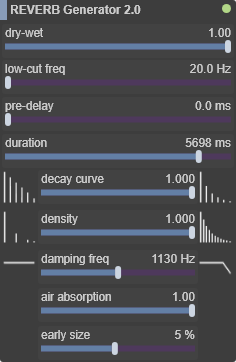
Stereo reverb that builds its own impulse: the reverb generator module generates one impulse per channel (early reflections, then a decaying noise) and convolves the input with it. Duration, decay curve, density, damping, air absorption and early reflections shape the room.
The audio inputs 1-2 go into the reverb generator, then to the audio outputs 1-2. Each change of a setting builds the impulse again: the sound fades out and in.
Play short sounds, then lower density and damping freq.
In the library: 1-Audio > Audio FX > Reverb.
Settings
dry-wet
Balance between the dry sound and the reverb, from 0 (dry sound only) to 1 (reverb only).
low-cut freq
Removes the bass sent to the reverb, from 20 to 4000 Hz.
pre-delay
Silence before the reverb, from 0 to 200 ms.
duration
Length of the reverb tail, from 100 to 10000 ms.
decay curve
Shape of the decay, from 0 (gentle) to 1 (steep). The small pictures on each side show the impulse at both ends of the fader.
density
Density of the reflections, from 0.001 to 1: low values give a sparse, grainy start. The pictures show a sparse and a dense impulse.
damping freq
Damping of the high frequencies, from 200 to 15000 Hz: the lower, the darker. The pictures show a low and a high damping.
air absorption
From 0 to 1: the higher, the sooner the tail darkens.
early size
Part of duration made of early reflections, from 0 to 100 %.
Settings window
advanced settings
 Use this icon in the patch header to open these advanced settings. Like the other icons of the header, it shows when the mouse is over the control panel of the patch (the green dot, always shown, turns the patch ON or OFF).
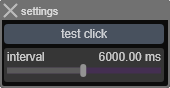
test click
ON: plays test clicks through the reverb, one every interval.
interval
Time between two test clicks, from 0 to 100000 ms.
See also
version 7.0.250921
Edit All Pages