PHYSICS
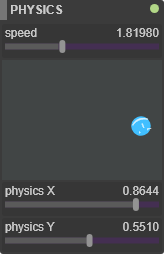
A point moves by itself in an XY pad: the physics engine of the panel-xy-pad module makes it bounce in the pad. Its position gives two values from 0 to 1, to modulate two parameters of Usine at once.
Wire the outlet of physics X or physics Y in this patch, or copy its modules into your own patch.
Drag the point with the mouse, release it and change speed.
In the library: 5-Data > Data Generators.
Settings
speed
Speed of the simulation, from 0 to 100. At 0 the point is frozen.
XY pad
The point bounces in the pad by itself. You can drag it with the mouse; when you release it, it moves on by itself.
physics X
Horizontal position of the point, from 0 to 1. Its outlet is an output of the patch.
physics Y
Vertical position of the point, from 0 to 1. Its outlet is an output of the patch.
See also
version 7.0.250921
Edit All Pages