Aspect Ratio
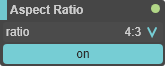
Crops the image to another width:height ratio (4:3, 16:9, 1:1...), keeping its center. The output is smaller than the input: a 1920x1080 video in 4:3 gives 1440x1080.
The video comes from the previous patch of the rack (or the rack input), goes through the video-geometric-change-aspect-ratio module and goes to the next patch of the rack (or the rack output).
In a rack, put it after the Video Player patch (3-Video) and drop a video out device in the rack output, then change ratio.
In the library: 3-Video > Video Geometric.
Settings
ratio
The new width:height ratio of the image. A video that already has this ratio passes unchanged.
- 16:9
- 4:3
- 3:2
- 21:9
- 2:1
- 5:4
- 16:10
- 1:1
- 25:16
- 19:10
- 5:3
- 1.85:1
- 2.35:1
- 2.39:1
- 2.55:1
on
Turns the effect ON or OFF. OFF bypasses the effect: the video passes unchanged.
See also
version 7.0.250921
Edit All Pages