ABRAIN Grain Freeze
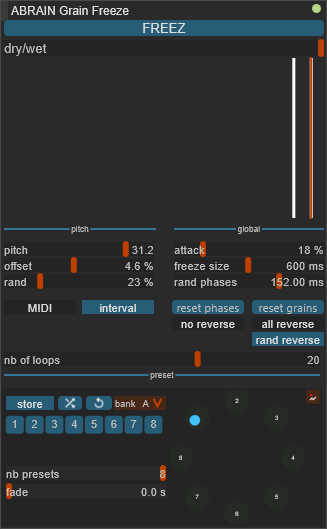
Freezes the sound in a cloud of up to 128 looping grains, built on the audio-sampler-grain-cloud module. While FREEZ is OFF, the sampler records the audio inputs 1+2 (11 s); when FREEZ is ON, nb of loops grains loop the last freeze size ms in stereo, with pitch, detune, random pitches and reverse.
Inputs: audio in 1-2 and MIDI in, which can set the pitch. Outputs: audio out 1-2, after a limiter. Presets store the settings and can be morphed.
Play a sound, press FREEZ, then move pitch and offset.
In the library: 1-Audio > Audio Brain.
Settings
FREEZ
OFF: the sampler records the input. ON: the grains loop the last freeze size ms of the recording.
dry/wet
Balance between the dry sound and the grains, from 0 (dry sound only) to 1 (grains only). It acts only while the sound is frozen.
buffer display
The large area below dry/wet shows the buffer of the sampler: a cursor follows the record position and a zone marks the part looped by the grains.
pitch
Pitch of the loops in semitones, from -48 to 48.
offset
Detunes the loops from one another, from 0 to 100 %.
rand
Amount of random pitch given to the loops, from 0 to 100 %.
attack
Fade of the loops, from 0 to 100 %.
freeze size
Length of the frozen part, from 3 to 10000 ms. With tempo sync ON, it follows synchro.
rand phases
Random shift of the starts of the loops, from 0 to 600 ms.
MIDI
ON: a MIDI note received on the MIDI input sets pitch (note 50 = 0).
tempo sync
ON: freeze size follows the tempo and the synchro list appears. OFF (caption interval): freeze size is set in milliseconds.
synchro
Shown when tempo sync is ON. Length of the frozen part as a note value of the tempo:
- bar
- beat
- 8th
- triplet
- 16th
- 24th
- 32th
- 48th
- 64th
- 128th
reset phases
Restarts all the loops at the same time.
reset grains
Clears the grains.
no reverse
ON: all the loops play forward.
all reverse
ON: all the loops play backward.
rand reverse
ON: loops chosen at random play backward. Only one of no reverse, all reverse and rand reverse is ON at a time.
nb of loops
Number of grains looping the frozen sound, from 2 to 128.
Presets
The preset zone stores the settings of the patch in slots and morphs between them.
store
ON: a click on a slot stores the current settings in it. OFF: a click on a slot recalls it.
random
The shuffle icon: gives random values to all the parameters of the patch.
reset
The circular arrow icon: sets all the parameters of the patch back to their default values.
bank
Bank of presets: A, B, C or D. Each bank has its own slots.
1 to 8
The preset slots. A click recalls the preset of the slot in fade seconds; with store ON, a click stores the current settings in the slot.
morphing surface
The numbered circles on the right are the presets. Drag the cursor between the circles to morph the presets: the closer the cursor is to a circle, the more its preset counts.
nb presets
Number of presets (circles) on the morphing surface, from 2 to 8.
fade
Time taken to reach a recalled preset, from 0 to 6 s.
automation
The small icon at the top right of the preset zone. ON: a trajectory and its controls appear, to move the cursor of the morphing surface automatically:
- trajectory: path of the cursor; double-click to add or delete a point of the path.
- play automation: moves the cursor along the trajectory.
- time: duration of the movement, from 0 to 60 s.
- loop: ON, the movement starts again at the end.
- reset: resets the trajectory.
See also
version 7.0.250921
Edit All Pages