Master Synchro Panel
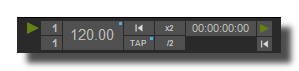
This panel drives the tempo and main Usine's synchronizations.
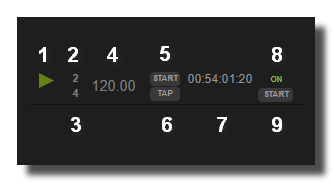
- Main synchro engine On/Off
- Cycle position
- Bar position
- Tempo
- Restart
- Tap
- Timecode
- Activate/deactivate timecode
- Restart timecode from 00:00:00:00
on-off
 Switches ON or OFF the synchronization.
tempo
Global tempo of Usine, 120 bpm by default. The tempo value can be set to any value from 0.001 to Billions of Billions bpm but the display range is limited.
Its range can be modified in the settings panel:
- Normal scale: from 30 to 300 bpm.
- Large scale: from 1 to 800 bpm.
more
Display more controls in the panel.
more shows or hides the cycle position, bar position, synchro restart, x2, /2, tap, timecode, timecode on and timecode restart controls.
cycle trigger
Sends a 1 at the beginning of each cycle.
bar trigger
Sends a 1 at the beginning of each bar.
beat trigger
Sends a 1 at the beginning of each beat.
8 trigger
Sends a 1 at the beginning of each 8th.
16 trigger
Sends a 1 at the beginning of each 16th.
cycle position
This indicates the current position in the cycle.
bar position
This indicates the current position in the bar.
8 position
This indicates the current position in the 8th.
16 position
This indicates the current position in the 16th.
cycle length
Number of bars in the cycle.
bar length
Length of the current bar in quarter notes (4 for a 4/4 bar, 3 for a 6/8 bar).
total bar position
This indicates the total bar position (from the start of the synchro).
cycle ppq
Position in the current cycle, in quarter notes (PPQ), from the beginning of the cycle.
total ppq
Position in quarter notes (PPQ) from the start of the synchro.
nb beat per cycle
Number of beats in the cycle
synchro restart
Restarts the synchronization from the beginning of the cycle.
tap
Enables you to adjust the tempo by successive taps.
The tempo is the average of the intervals between the taps, rounded to an integer, and is set from the second tap. A pause of more than 2 seconds starts a new series of taps.
reset tap
Reset the tap counter in order to enter a new tap tempo.
x2
Multiplies the current tempo by 2.
Not visible by default.
/2
Divides the current tempo by 2.
Not visible by default.
timecode
Current timecode.
timecode on
Activate/deactivate the timecode.
timecode restart
Restarts the timecode from 00:00:00:00.
Settings
saved in preset
Determines if parameters of this object are saved in the preset-panel.
fade preset
Parameters of the this object can cross faded when you recall a preset in the grid.
Optional setting, does not appear on all objects.
bar list
List of bars with their time signature for the cycle. A cycle can be made of several bar with different time signatures.
for example:
4/4
4/4
3/4
Represents a cycle of two 4/4 bars and a 3/4 bar, so 11 beats. Allowed time signatures are x/1, x/2, x/4, x/8, x/16.
Moreover, you can define a precise tempo for each bar, for example
4/4=120
3/8=90
7/4=100
The first 4/4 bar will be at tempo=120, the second 3/8 at 90 and so on.
auto restart
When ON (default), the synchronization restarts from the beginning each time it is switched ON again.
perfect synchro
When ON, a tempo below 240 bpm is adjusted so that a bar lasts an exact number of audio blocks.
linked to main ON-OFF
When ON (default), the main on-off of the master-panel also switches the synchronization ON and OFF.
large scale
Lets you use a tempo display range from 1 to 800 bpm.
frame rate
Sets the timecode frame rate, from 10 to 60 fps, 24 fps by default.
Customize Interface
Choose which elements are visible in the panel.
- show on-off
- show tempo
See also
- Master Synchro Panel
- Top Header Panel
- Master Light Panel
- Master Panel
- Usine Master Light Settings
- Usine Master Settings
- Usine Master Vu Meters
- Synchro
- Synchro Quantize Data
- Synchro Idle Clock
- Synchro Local
- Synchro Tempo to Delay
- Synchro Clock Divider
- Synchro Master
- Synchro Quantize MIDI
- Synchro Swing Trigger
- Synchro Quantize Trigger
- Synchro Clock
version 7.0.250921
Edit All Pages