Main Menu
Creates a main menu for the application. The structure of the menu is defined as an indented text (with spaces) representing the menu's structure.
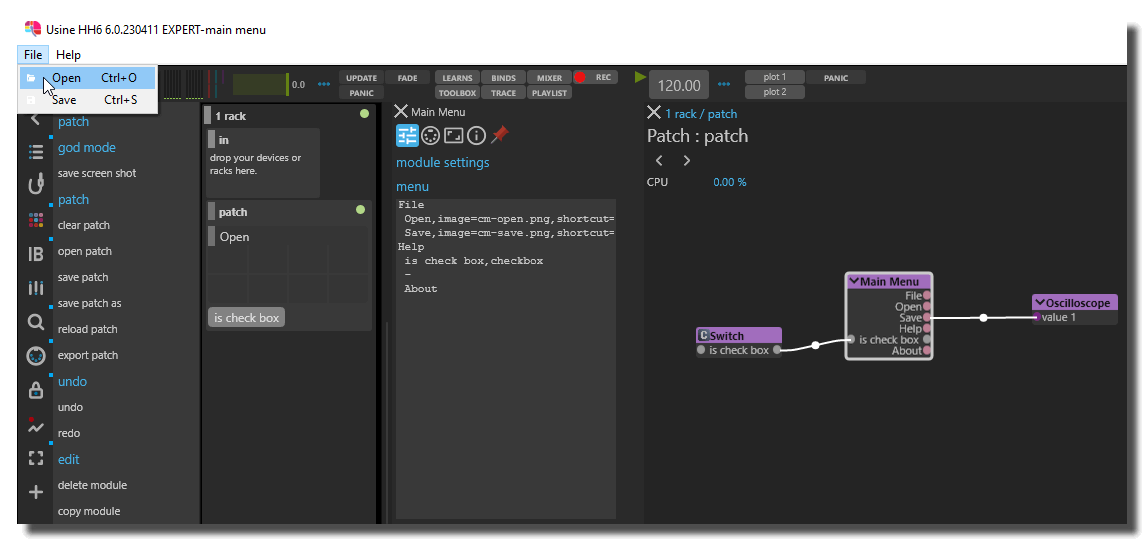
File
 Open
 Save
Edit
 Command 1
  Sub Command 1
  Sub Command 2
 Command 2
menu structure
The menu structure is defined as an indented text. Each line represents a menu item. Sub-menus are defined by indenting the menu item with spaces.
Additional Options
images
The tag image= add an image at the left of the menu item. Images must be present in the Usine package or specified as an absolute path. Image names must not contain the comma character.
File
 Open,image=open.png
 Save,image=c:\users\test\images\save.png
shortcuts
To set a shortcut for the menu item, set the shortcut= tag.
File
 Open,shortcut=Ctrl+O
 Save,shortcut=Ctrl+S
 Save All,shortcut=Shift+Ctrl+S
The allowed shortcuts modifiers and special characters are:
- Cmd+
- Shift+
- Alt+
- Ctrl+
- BkSp
- Tab
- Esc
- Enter
- PgUp
- PgDn
- End
- Del
- Home
- Left
- Up
- Right
- Down
- F1..F12
To avoid shortcut conflicts with the main Usine's shortcuts, activate the setup-panel-tab-expert disable-all-key-learn option
checkbox
With the tag checkbox the menu item is defined as a checkbox.
Options
 Auto Save,checkbox
 Snap to grid,checkbox
 Lock,checkbox
mixed options
Additional options can be mixed. They must be separated by commas ,.
Options
 Auto Save,checkbox,image=save.png,shortcut=Alt+Enter
 Snap to grid,checkbox,image=snap.png,shortcut=Shift+Alt+Enter
separator
If the caption of the menu is - (hyphen) the menu item becomes a separator line.
File
 Open
 Save
 -
 Save All
Common Settings
info
show manual
Button. Opens the manual page of the selected object (or of its parent module for a control) in the web browser. If no page exists for this object, an error is traced in the trace panel.
For more details about information/help creation, see create-help-file.
description
Free multi-line text attached to the module, saved with the patch. It is only meant as an internal note for the patch designer: it is not displayed in the interface.
ID's
visible only in god mode, see setup-panel-tab-expert.
unique ID
Read-only, not saved. Current private numeric ID of the object, used internally to identify it (for example as the target of a bind ID).
preset ID
Read-only, not saved. Private ID used to store and recall the values of this control in presets.
recreate ID
Button. Generates a new unique ID, original ID and preset ID for the object. Use it if you experience difficulties in Polyphonic mode or if two objects share the same ID. Preset values and binds referring to the old IDs are lost.
Object Remote Address
absolute
Read-only, not saved. Absolute address of the object in the Usine objects tree, built from the workspace root. This is the address to use to reach the object from scripts, the objects panel or remote messages. Only shown for objects that are registered in the objects list. See objects-address.
local
Read-only, not saved. Address of the object relative to the current patch, valid inside that patch only. See objects-address.
user addr
Free user-defined address for the object (empty by default). When set, the object is also registered in the objects tree under this name, so it can be reached independently of its position in the workspace (the value is also reported in the mouse-over and mouse-down chunks). Changing it rebuilds the objects list. Only available on objects that support a user address. See objects-address.
See also
- Panel Embedded Web Page
- Panel Draw Trajectory Spline
- Panel Meta Surface
- Control Fader String
- Control Switch Double
- Panel XY Draw
- Main Menu
- Panel XYZ Draw
- Control Knob
- Panel Oscilloscope Data
- Panel XY Pad
- Control Fader Color
- Panel Container
- Panel Shape
- Panel Line
- Panel Draw Trajectory Spline 3D
- Control Audio Vu-Meter Vertical
- Panel Oscilloscope XY
- Control Led
- Panel Array Editor String
- Panel Draw Pixels
- Panel Ruler
- Control Knob MIDI Notes
- Panel Text
- Control Fader Folder
- Control Fader Filename
- Panel Wave Display
- Panel Range Fader
- Control Switch
- Control Fader MIDI Notes
- Control Vu Meter Horizontal
- Panel Matrix
- Panel Points Path
- Control Listbox
- Panel Browser
- Control Vu Meter Led
- Control Fader Timecode
- Control Play Switch
- Panel Image
- Panel Oscilloscope Audio
- Control Fader Horizontal
- Control Listbox Buttons
- Panel Meta Surface 3D
- Control Combobox
- Panel OpenGL
- Panel Popup Window
- Panel XYZ Polygon
- Control Fader Vertical
- Panel Draw Trajectory
- Panel Separator
- Control Button
- Panel Array Editor Data
- Panel XYZ Pad
version 7.0.250921
Edit All Pages