Usine Patch Settings
Retrieves and sets various settings of the current patch.
See control-panel and patch-editor-panel for more info.
Settings
name
Name or caption of the object as it appears in its visible interface.
filename
Full path of the file the patch was loaded from or last saved to, empty if the patch has never been saved. It's a read only setting: it is not saved with the patch and can only be exposed as an outlet, not as an inlet.
info
Manual page about of this object.
show manual
Opens the default web browser the selected object and displays an html page.
saved in rack preset
Determines if parameters of this object are saved in the preset-panel of the rack.
fade preset
Parameters of the this object can cross faded when you recall a preset in the grid.
Optional setting, does not appear on all objects.
can be randomized
When ON, this object will be randomized when using the randomize command.
can be reset
When ON, this object will be reset to its default value when using the reset command of its patch.
show when active on usine grid
Determines if the rack or the patch is automatically maximized when it's active on the grid and minimized when inactive.
hint
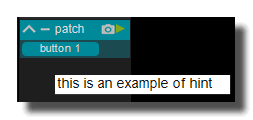
Hint text displayed on mouse over.
saved in preset
Determines if parameters of this object are saved in the preset-panel.
fade preset
Parameters of the this object can cross faded when you recall a preset in the grid.
Optional setting, does not appear on all objects.
hint
Hint text displayed on mouse over.
undo enabled
Enables or disables the undo/redo history of the patch. Default ON. When OFF, Usine no longer stores an undo snapshot of the patch after each editing operation, and the undo and redo commands are refused with a warning message. This can speed up the patching interface on very heavy patches and avoids the saving after each operation. The setting is only available on normal patches (not on sub-patches or device patches) and the value of the main patch applies to all its sub-patches.
It's not recommended to disable it.
Toolbar
toolbar-enabled
 Enables the panel.
toolbar-minimize
 Minimizes or maximizes the panel.
toolbar-preset
 Opens/closes the preset panel.
toolbar-reduce
 Reduce the size of the current object.
devices specific options
receive MIDI clock
Only available on MIDI input device patches. When ON, the MIDI real-time messages received on this device drive the master synchro panel of Usine: timing clock messages set the tempo (measured every 48 clocks, ie. every 2 beats), a start message restarts the synchro from the beginning and switches it ON, a continue message switches it ON, a stop message switches it OFF and song position pointer messages re-synchronize the beat position inside the bar. When OFF, these messages are ignored.
send MIDI clock
Only available on MIDI output device patches. When ON and the device is active, Usine sends MIDI timing clock messages to this output device at the tempo of the master synchro panel (24 clocks per beat), plus a start message when the synchro is switched ON and a stop message when it is switched OFF, so that external devices can follow Usine's tempo. When OFF, no clock message is sent.
motorized device
Only available on MIDI output device patches. When ON, Usine considers that the hardware attached to this MIDI output device is motorized (motor faders, LED rings, etc.): each time a control that is MIDI-learned on the input device of the same name changes in Usine, its new value is sent back to this output device so the hardware stays in sync. When OFF, no feedback is sent to this device, unless the global option MIDI feedback to all devices of the setup panel is ON.
recalling preset
Sends value if Usine is currently recalling a preset, 0 otherwise.
presets
current preset num
Current preset number.
recall current preset
Recalls the current preset number.
presets list
Outputs a list of all presets names as a comma-text.
fade duration
Duration of the fade when recalling a preset (in seconds).
CPU info
CPU
CPU load of the patch (in percent).
various
fade gain out
Current grid fade gain out for the patch.
randomize patch
Randomize all the patch parameters.
randomizing
Sends 1 when randomizing the patch.
reset patch
Reset all the patch parameters to their default value.
reseting
Sends 1 when resetting the patch.
edit patch
Opens the patch edition window.
minimize
Minimizes the control-panel of the current patch.
maximize
Maximizes the control-panel of the current patch.
toggle minimized state
Toggles the minimized state of the control-panel of the current patch.
reduce
Reduces the control-panel of the current patch.
enlarge
Enlarges the control-panel of the current patch.
toggle reduced state
Toggles the reduced state of the control-panel of the current patch.
select control panel
Selects the control-panel of the current patch.
layout
zoom scale
Current zoom scale of the patch.
can zoom
When ON, the patch can be zoomed.
left
Left position of the control panel in pixels.
top
Top position of the control panel in pixels.
width
Width of the control panel in pixels.
height
Height of the control panel in pixels.
position percent x
Horizontal position of the control panel (0..1).
position percent y
Vertical position of the control panel (0..1).
width percent
Width of the control panel as a percentage.
height percent
Height of the control panel as a percentage.
resize grip enabled
When ON, the resize grip is enabled (global setting).
resizable left
When ON, the left edge can be resized.
resizable right
When ON, the right edge can be resized.
resizable top
When ON, the top edge can be resized.
resizable bottom
When ON, the bottom edge can be resized.
minimized
When ON, the control panel is minimized.
snap to grid
When ON, modules snap to the grid.
grid size
Size of the grid in pixels.
auto resize
When ON, the control panel auto resizes to fit its content.
auto resize margin
Margin in pixels for auto resize.
force reorganize
Forces the reorganization of the modules layout.
display location
Location of the patch panel.
appearance
global color
Global color applied to the patch.
ignored in parent global color
When ON, this patch ignores the parent global color.
snapshot name
Name of the current snapshot.
z order
When ON, the control panel is displayed on top of other panels.
opacity
Opacity of the control panel (0..1).
transparent
When ON, the control panel background is transparent.
background color
Background color of the control panel.
remote highlight color
Highlighted color of the control panel.
image file
Background image file for the control panel.
image fit mode
Force the image file to adapt its displayed size to the size of the object.
- proportional: the image keeps its proportion ratio and is left aligned,
- scaled: the image is scaled to the object size,
- original: keeps the original size
- clipped: the image is clipped to the object size, and centered,
- scaled: the image is scaled to the object size taking into account the border-size of the control.
show border
When ON, the border is visible.
border color
Color of the border.
border width
Width of the border in pixels.
round size
Corner rounding radius in pixels.
don't draw selection border
When ON, the selection border is not drawn.
caption
show caption
When ON, the caption is visible.
caption font color
Font color of the caption.
caption font size factor
Font size scale factor of the caption.
caption horizontal align
Alignment of the caption text.
caption font
Font name for the caption.
caption font bold
When ON, the caption text is bold.
caption font italic
When ON, the caption text is italic.
caption font underline
When ON, the caption text is underlined.
header
show header
When ON, the header bar is visible.
header height
Height of the header bar in pixels.
header color
Color of the header bar.
solid header color
When ON, the header bar is filled with a solid color.
toolbar
show toolbar
When ON, the toolbar is visible.
toolbar size factor
Size scale factor of the toolbar.
info
num of modules
Number of modules in the patch (read only).
num of wires
Number of wires in the patch (read only).
num of quicklinks
Number of quicklinks in the patch (read only).
Common Settings
info
show manual
Button. Opens the manual page of the selected object (or of its parent module for a control) in the web browser. If no page exists for this object, an error is traced in the trace panel.
For more details about information/help creation, see create-help-file.
description
Free multi-line text attached to the module, saved with the patch. It is only meant as an internal note for the patch designer: it is not displayed in the interface.
ID's
visible only in god mode, see setup-panel-tab-expert.
unique ID
Read-only, not saved. Current private numeric ID of the object, used internally to identify it (for example as the target of a bind ID).
preset ID
Read-only, not saved. Private ID used to store and recall the values of this control in presets.
recreate ID
Button. Generates a new unique ID, original ID and preset ID for the object. Use it if you experience difficulties in Polyphonic mode or if two objects share the same ID. Preset values and binds referring to the old IDs are lost.
Object Remote Address
absolute
Read-only, not saved. Absolute address of the object in the Usine objects tree, built from the workspace root. This is the address to use to reach the object from scripts, the objects panel or remote messages. Only shown for objects that are registered in the objects list. See objects-address.
local
Read-only, not saved. Address of the object relative to the current patch, valid inside that patch only. See objects-address.
user addr
Free user-defined address for the object (empty by default). When set, the object is also registered in the objects tree under this name, so it can be reached independently of its position in the workspace (the value is also reported in the mouse-over and mouse-down chunks). Changing it rebuilds the objects list. Only available on objects that support a user address. See objects-address.
horizontal scroller
show horizontal scroller
Allows or not the horizontal scroller to be displayed at the bottom of the container. Default ON. When ON, the scroller appears automatically as soon as the content of the container is wider than the container itself and disappears when the content fits again; when OFF, it is never displayed and the content is scrolled back to its origin.
The scroller appears only if the container is smaller than the controls inside. It is also never displayed when the container is in auto size mode.
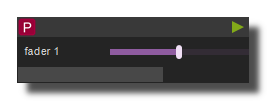 Example of horizontal scroller
horizontal scroller height
Height of the scroller bar in pixels, from 0 to 100, default 14.
horizontal scroller color
Color of the scroller thumb (the moving part whose length represents the visible portion of the content).
horizontal scroller back color
Background color of the scroller track. Default is fully transparent, so only the thumb is visible.
horizontal scroller opacity
Opacity of the scroller, from 0.2 to 1, default 1.
See also
- Usine Hidden String
- Usine Main Grid Active Elements List
- Usine IB Settings
- Usine Preset Module
- Usine Quantize Settings
- Usine Master Light Settings
- Usine Rack Settings
- Usine Setup Settings
- Usine Master Settings
- Usine Main Grid Fade Value
- Usine Global Informations
- Usine Trace String
- Load Rack
- Usine Language ID
- Usine Master Vu Meters
- Usine Trace Data
- Usine Trace Settings
- Usine Trash Settings
- Usine Main Grid Section Settings
- Load Workspace
- Usine Setup Value Color
- Usine Translator String
- Usine Progress Bar
- Usine Main Grid Settings
- Usine Toolbox Settings
- Usine Grid Module
- Usine Get Trace
- Usine Patch Settings
- Usine Setup Value DATA
- Usine Setup Value String
- Usine Workspace Settings
- Load Patch
- Usine Preset Settings
- Usine Trace MIDI
- Patch Current Rack Number
- Patch Current Patch Number
version 7.0.250921
Edit All Pages